

/PairaVoice-Start-A-Conversation-nobg-md.png?width=200&height=300&name=PairaVoice-Start-A-Conversation-nobg-md.png)


















.png)

.png)


 ChatGPT
 Google AI
 Perplexity
 Claude
 Grok
GrokA ten-minute patient visit can easily produce fifteen minutes of documentation afterward. Multiply that across a full patient load, and transcription becomes one of the biggest hidden time costs in clinical work. A good medical transcription app can shrink that gap significantly. The wrong one just moves the burden somewhere else, creating scattered records, unreviewed transcripts, or documentation that doesn't hold up to compliance scrutiny.
The right app should fit the way care is actually documented. That means looking beyond speech-to-text accuracy and asking how the app handles patient information, review, storage, and final documentation.
What a medical transcription app should actually do
A medical transcription app helps healthcare professionals turn spoken information into written text. Some apps are built for dictation after a visit and can capture live conversations, generate summaries or help organize notes for review.
The core value is simple: less time spent typing from memory. A useful app should help clinicians capture details closer to the moment they are spoken, then make the output easy to review and correct.
For a broader look at the category, it helps to understand how medical transcription software works. But when choosing an app, the bigger question is whether it fits the workflow your team will use every day.
Start with the clinical workflow
Feature lists can be distracting. Before comparing apps, healthcare teams should map the workflow they want to support.
Will clinicians dictate notes after an appointment? Will the app capture conversations during a visit? Will staff upload recordings for later review? Each use case changes what the app needs to do well.
The final destination also matters. A transcript should not become another record staff have to manage separately. Teams need a clear path from speech capture to reviewed documentation, with rules for where the final note belongs.
A good app reduces documentation friction. If it creates extra steps, scattered records or uncertainty about who reviews the output, it may not solve the problem it was chosen for.
Evaluate accuracy in medical language
General transcription accuracy is not enough in healthcare. Clinical language has names, abbreviations and terms that may not appear in everyday speech.
A medical transcription app should be tested with the kind of language your team actually uses. Demo audio is helpful, but it rarely reflects real clinical environments with background noise, fast speech or specialty terminology.
Small transcription errors can change meaning. A medication name, dosage, symptom or instruction should not be accepted just because the transcript looks polished.
Accuracy should also be evaluated over time. If clinicians keep correcting the same types of errors, the app may not be a good fit for that specialty or workflow.
Checklist: 8 Questions to Ask Before Choosing a Medical Transcription App
|
Question |
Why It Matters |
|
Does it accurately handle clinical language, not just general speech? |
Medication names, dosages, and abbreviations are where general transcription tools fail most often. |
|
Does the vendor support HIPAA-regulated workflows and offer a BAA? |
Any app touching PHI needs a clear compliance answer. |
|
Where is audio processed and stored, and for how long? |
Determines your actual exposure if data is breached or mishandled. |
|
Is patient data ever used for AI model training? |
A meaningful privacy distinction many vendors don't volunteer. |
|
Is there a built-in review step before transcripts become part of the record? |
Prevents false starts, side comments, or errors from being documented as fact. |
|
Can it be used on personal devices, or only managed ones? |
Mobile convenience often creates the biggest compliance blind spots. |
|
Who can access, export, or delete transcripts? |
Access control and retention rules matter as much as the transcription itself. |
|
Does it fit your actual workflow (post-visit dictation vs. live capture vs. uploads)? |
The best app on paper still fails if it doesn't match how your team actually documents care. |
Make human review part of the process
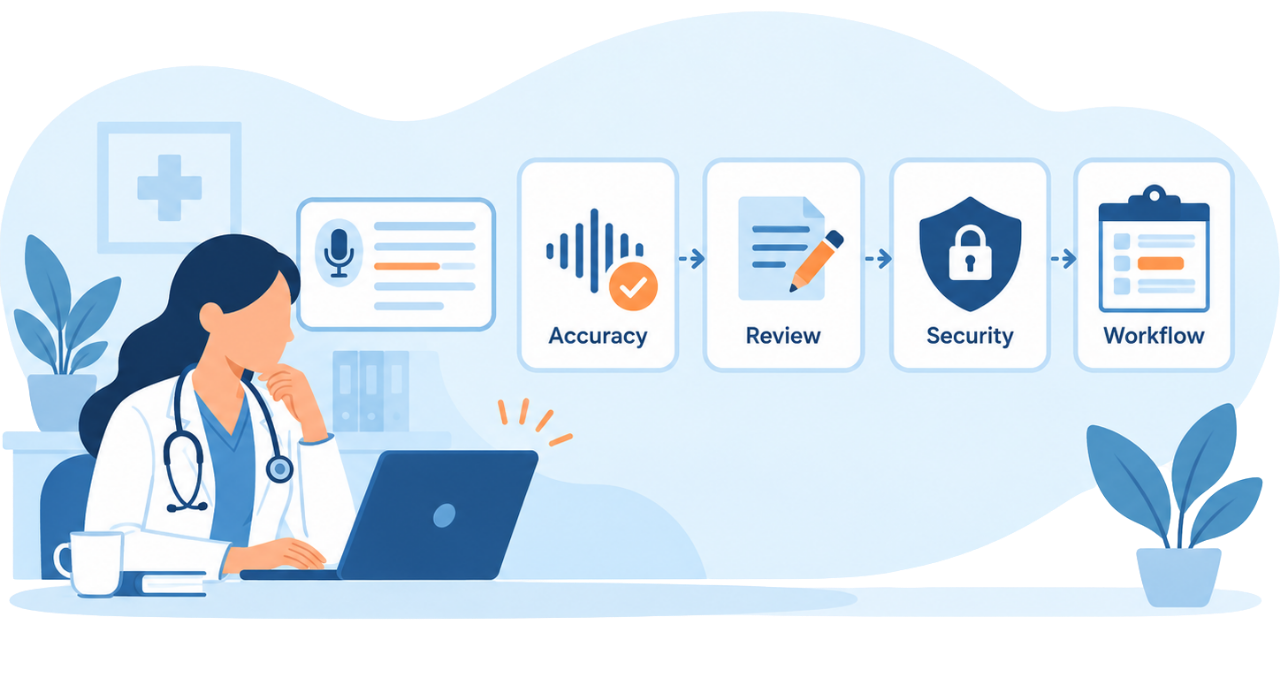
AI transcription can speed up documentation, but clinicians still need to review the output before it becomes part of the record.
That review step should be built into the workflow from the beginning. Staff need time and a clear process to correct transcripts, confirm meaning and remove anything that does not belong in the final note.
Blind copy-paste is risky. A transcript may include false starts, side comments, duplicate information or details that were discussed but should not be documented in that form.
The safest workflow treats the app as a drafting aid. It gets the team closer to usable documentation, while the clinician remains responsible for the final record.
Check HIPAA and patient data handling
Medical transcription apps often handle protected health information. Audio recordings, transcripts, summaries and draft notes may all include patient details.
Before using an app with PHI, healthcare teams should confirm whether the vendor supports HIPAA-regulated workflows and offers a BAA when required. They should also understand what happens to the data during and after transcription.
Key questions include where audio is processed, whether transcripts are stored, who can access them and whether recordings or text are used for AI training. The vendor should be able to answer these questions clearly.
A secure app can still create risk if the workflow is poorly controlled. Staff should know which account to use, where transcripts may be stored and how long records should remain available.
Consider mobile use carefully
Many medical transcription apps are used on phones or tablets because that is where clinicians need them most. Mobile access can be useful, especially when notes need to be captured quickly.
It also adds risk. Personal accounts, cloud backups, notification previews and file sharing can all move patient information outside approved systems.
Healthcare teams should decide whether the app may be used on personal or only on managed devices. They should also define rules for downloads, transcript exports and copying text into other tools.
Convenience matters, but it should not blur where patient information lives.
Look for features that support documentation
The best medical transcription app is not always the one with the longest feature list. The most useful features are the ones that help staff move from spoken information to reviewed documentation.
Searchable transcripts can help clinicians find details later. AI summaries or draft notes can reduce the time spent organizing raw conversation text. SOAP note support may be valuable when teams need a more structured clinical format.
Review tools are just as important. Staff should be able to correct text easily, confirm what belongs in the record and avoid leaving sensitive information in unmanaged places.
Access controls and retention settings also matter. Healthcare teams should know who can view transcripts, who can export them and how records can be deleted when they are no longer needed.
Know when an app is not enough
No single app can fix a documentation workflow that is unclear from the start. Before choosing a tool, healthcare teams need to understand what the app is expected to handle and where its role ends.
A lightweight app may work well for note drafting, quick capture, or reviewing spoken details after a visit. More complex workflows may call for deeper EHR integration, enterprise controls, professional transcription support, or a formal approval process before anything reaches the patient record.
The deciding factor is the risk and scale of the work. Capturing short notes after a routine encounter is very different from managing high-volume clinical documentation across multiple teams.
How PairaVoice Supports Medical Transcription Workflows
A strong transcription workflow should help clinicians capture spoken information in the moment, not leave them reconstructing details from memory afterward.
PairaVoice is a mobile app for real-time voice translation, transcription, and AI note-taking. During a patient visit, PairaVoice can capture the conversation as it happens, whether that's a routine check-in or a more complex discussion involving multiple languages, and turn it into a structured, reviewable transcript without disrupting the visit itself.
For teams handling higher documentation volume, PairaVoice Pro adds features built specifically for clinical workflows: automatic SOAP note generation and saved, searchable transcripts staff can return to later. Instead of manually organizing raw conversation notes after every visit, clinicians get a structured starting point they can review, correct, and finalize.
Human review remains part of every workflow. Transcripts, summaries, and SOAP notes should be checked for accuracy before they're used in official documentation or shared through an approved system, PairaVoice is designed to support that review step, not bypass it.
See how PairaVoice fits into your documentation workflow
Choosing a medical transcription app is a workflow decision. The app has to fit how clinicians capture information, review output and move final documentation into the right system.
Speed is valuable, but it should not come at the cost of accuracy or patient data control. The right app helps healthcare teams reduce manual documentation work while keeping review, privacy and responsibility in the process.
Common Mistakes Teams Make When Adopting a Transcription App
Even a well-chosen app can create problems if the rollout isn't handled carefully. A few mistakes show up repeatedly:
Skipping the pilot with real clinical language. Demo audio rarely reflects a real exam room: interruptions, background noise, regional accents, and specialty-specific terminology. Teams that skip testing with their own recordings often discover accuracy gaps only after the app is already in use.
Treating the transcript as the final record. A transcript is a draft, not documentation. Teams that copy-paste transcripts directly into the patient record without review risk including false starts, irrelevant asides, or errors that were never meant to be permanent.
Not defining where the final note lives. Without a clear rule for where the reviewed, finalized version goes, whether that's the EHR, a specific folder, or another approved system, transcripts and drafts can end up scattered across personal devices, email threads, or unmanaged cloud storage.
Allowing personal devices without a policy. Mobile convenience is one of the biggest reasons teams adopt transcription apps, but without device rules, patient information can end up in personal cloud backups, notification previews, or unsecured file shares.
Assuming compliance is the vendor's job alone. A HIPAA-compliant app doesn't guarantee a HIPAA-compliant workflow. Staff still need training on which accounts to use, how long to retain records, and what to do if a transcript is created by mistake.
Avoiding these mistakes often matters more than which app a team ultimately chooses.
FAQ
What is a medical transcription app?
A medical transcription app helps healthcare professionals turn spoken information into written text. Some apps also support summaries, searchable transcripts, structured notes or documentation workflows.
What should healthcare teams look for in a medical transcription app?
Healthcare teams should look for clinical language accuracy, clear data handling, review workflows and secure transcript storage. The app should also fit the way clinicians already document care.
Does a medical transcription app need to be HIPAA compliant?
If the app handles PHI on behalf of a healthcare provider, the team should confirm that the vendor supports HIPAA-regulated workflows and offers a BAA when required.
Compliance also depends on how the team uses the app. Staff need approved accounts, clear storage rules and a review process for transcript output.
Can doctors use a phone for medical transcription?
Yes, but the workflow should be approved. Healthcare teams should consider device security, personal account use, transcript storage, cloud backups and where final documentation belongs.
Are AI medical transcription apps accurate?
AI medical transcription apps can save time, but they can still make mistakes. Clinicians should test the app with real clinical language and review output before using it in official documentation.
What is the difference between a medical transcription app and medical transcription software?
A medical transcription app often focuses on convenient capture and review, sometimes on a mobile device. Medical transcription software is a broader category that may include enterprise platforms, integrations and larger documentation workflows.
Reviewed by

Founder and CTO
He is Co-Founder and CTO of Pairaphrase and a leader in translation technology with more than two decades of experience improving how organizations communicate across languages. His work focuses on making multilingual communication more accurate, efficient, and accessible through AI-driven translation solutions, practical innovation, and a strong emphasis on usability, quality, and security.