


/PairaVoice-Start-A-Conversation-nobg-md.png?width=200&height=300&name=PairaVoice-Start-A-Conversation-nobg-md.png)

















Collaborative Translation Platform for Secure Teamwork
Pairaphrase gives teams one secure workspace to translate multilingual documents together, involve the right reviewers, and keep feedback and translation decisions connected through real-time collaboration.



Controlled reviewer access · File and batch sharing · In-context comments · Segment history · Roles and groups · Translation Memory · Glossaries · Cloud-based TMS
Bring reviewers, translators and stakeholders into one workflow
Collaborative document translation works best when the right people can review, comment and contribute without moving files through email threads or disconnected tools.
With Pairaphrase, everyone works from the same document and project context, so fewer questions, edits, and decisions get lost between tools.
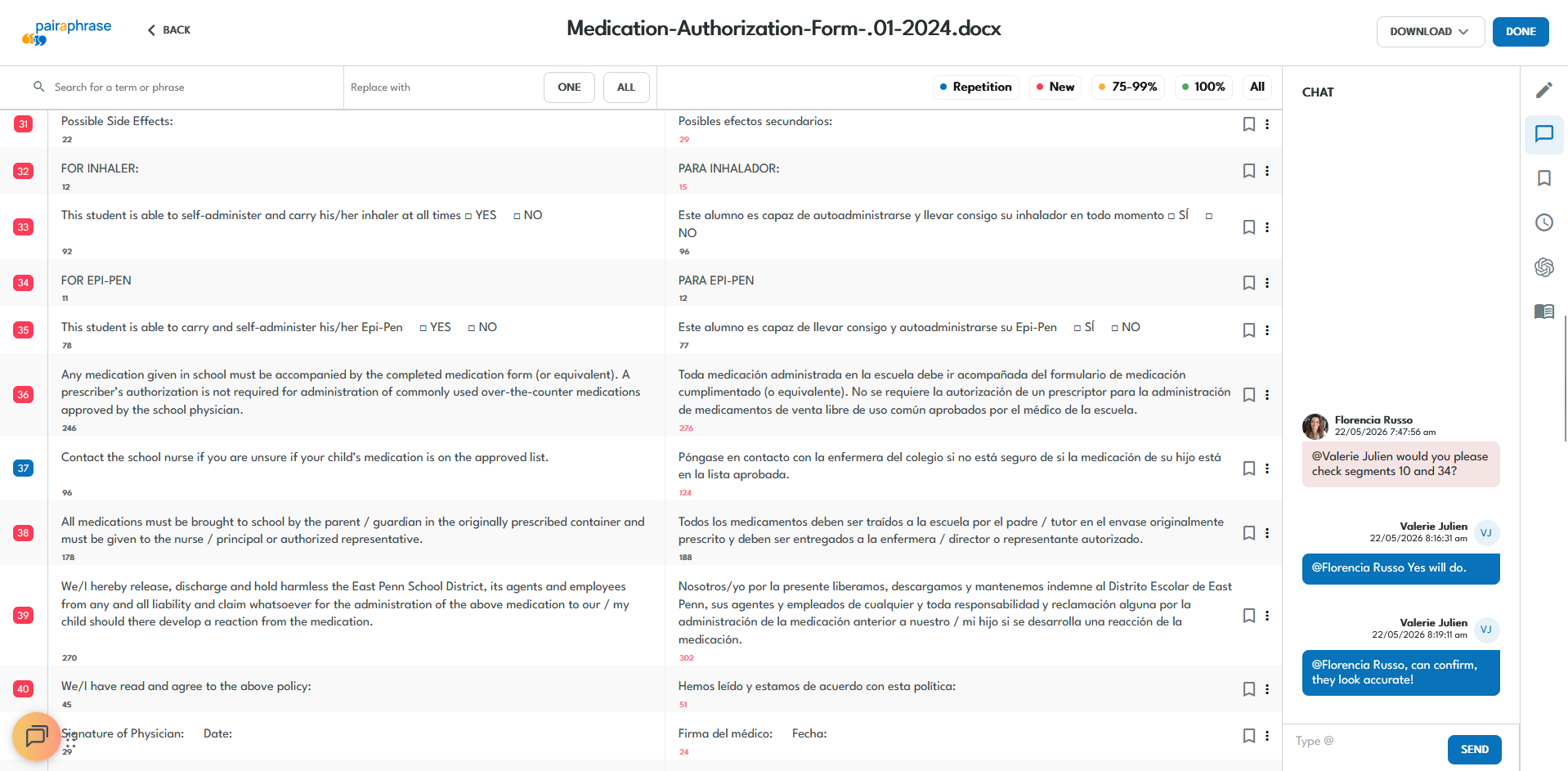
Manage collaborative translation with greater control
Pairaphrase brings teamwork into the translation workflow with built-in tools for sharing, permissions, comments, change visibility and reusable translation assets.

Reviewer access
Invite reviewers to contribute in the Translation Editor while limiting upload, download, and administrative permissions.

File sharing
Share translated documents with authorized teammates so they can review and contribute inside Pairaphrase.

Batch sharing
Share groups of files by language to organize multilingual review across recurring or high-volume projects.

Groups
Organize users by department, location, language, client, or another team review structure.

Comments and messaging
Use file-specific chat, comments, and teammate tags to keep questions and feedback connected to the translation project in real time.

Segment History
View previous segment edits and see who made updates to support accountability during human review.

Translation Memory
Reuse approved translations so reviewer edits improve consistency and reduce repeat work across future projects.

Glossaries
Apply approved product names, regulated terminology, acronyms, and brand language consistently across reviewers and teams.

How collaborative document translation works in Pairaphrase
From the first share to final approval, each file stays tied to its reviewers, comments, change history, and approved terminology. Here’s how it works in Pairaphrase:

Open the project that needs team input
Select an individual translated document or a batch of files.
Share the file or batch
Invite teammates, reviewers or subject matter experts to review one document or a group of files.

Set roles and groups
Manage who can review, edit, upload, download, or administer the account.

Review and comment in context
Reviewers can ask questions, discuss changes, and reference previous edits without leaving the project.

Reuse approved language
Save approved edits to Translation Memory and apply glossary terms to future translation work.

Complete human review
Resolve open comments, confirm the final language, and complete the translated document.

WATCH COLLABORATION IN ACTION
See a collaborative translation workflow in Pairaphrase
Watch how teams share multilingual documents, assign reviewer access, discuss changes, track edits, and reuse approved language within one project.
When teams need collaborative file translation
Use Pairaphrase when multilingual documents require coordinated input, controlled access, consistent terminology, or human review before finalization.
Review translations with subject-matter experts
Invite internal experts to verify specialized terminology, technical accuracy, and context without separating their feedback from the translation project.
Coordinate review across departments or locations
Share multilingual documents with authorized contributors across departments, offices, regions, or language groups while controlling how each person participates.
Share multiple files with reviewers
Use file and batch sharing to coordinate collaborative review across several documents or languages without manually distributing and tracking attachments.
Collaborate on sensitive document translation
Use controlled access, reviewer permissions, secure file sharing, and human review when multilingual documents contain sensitive or regulated information.
Maintain terminology across contributors
Use shared glossaries and Translation Memory to keep approved terminology, product names, acronyms, and recurring language consistent across contributors.
Manage updates to translated documents
Keep reviewers involved as policies, manuals, presentations, forms, and other multilingual documents are revised over time.
Centennial Schools
Centennial Schools used Pairaphrase to streamline file sharing and human review, supporting 100,000 translated words per month and saving 1,000+ hours annually.

Carestream Dental
Carestream Dental gave translators and technical reviewers distinct roles, helping teams securely finalize multilingual documentation in 15 days using Pairaphrase.

Aquatrols
Aquatrols involved native-speaking distributors in translation review, using Pairaphrase to save 2,000+ hours annually while improving regional accuracy.
Teams that use our collaborative translation platform
Pairaphrase is useful wherever multiple people contribute to multilingual documents, terminology, or final approval.

Education teams
Collaborate on multilingual education communications, student-related documents, family notices and school learning materials.

Healthcare teams
Centralize collaborative translation workflows for patient-facing, administrative and internal communications that need more control.
Language service providers
Share projects with client reviewers and subject matter experts, organize review by language and support collaboration across translation teams.

Marketing teams
Collaborate cross-functionally on multilingual marketing campaign copy, regional messaging, landing pages, email content and brand-sensitive language.
Administrative teams
Co-create recurring forms, notices, policy updates and other internal communications across departments and languages.

Technical teams
Collaborate on multilingual manuals, standard operating procedures, safety documents and technical files with product, engineering, or operations experts.
Collaborate securely on sensitive multilingual documents
Coordinate multilingual work on sensitive or regulated documents within a controlled environment. Pairaphrase provides the access, visibility, and language controls teams need for governed translation work:

- Access controls (RBAC): Manage roles, permissions, and user groups.
- Secure file sharing: Keep translation projects centralized instead of scattered across email and tools.
- SSO and MFA: Support secure authentication and streamlined access management.
- Encrypted data handling: Protect documents during storage and transmission.
- Review visibility: Track edits, contributors, and project history.
- Human review: Keep experts involved for sensitive or specialized content.
- Translation Memory and glossary controls Maintain consistency with approved terminology.
- Compliance alignment: Support workflows aligned with HIPAA, FERPA, GDPR, ISO 27001, PCI DSS, and SOC 2 requirements where applicable.
Connect translation work with the tools your team already uses
Pairaphrase combines built-in translation and document-processing technology with integrations. Together, they connect collaborators, files, access controls, and communication systems.
Built-in technologies that support collaborative translation

Microsoft Translator
Generate an initial translation with Microsoft Translator in Pairaphrase that authorized team members can refine and improve together.

Google Translate
Create translations with Google Translate in Pairaphrase while keeping collaborative feedback and approved edits connected.

DeepL
Use DeepL translation technology to create translations in Pairaphrase’s collaborative environment without switching tabs.

ChatGPT
Collaborate on translations generated using ChatGPT-powered assistance within Pairaphrase’s secure workspace.

ABBYY OCR
Use Pairaphrase to extract text from scanned PDFs and image-based documents while keeping collaborators connected to the same file.

Adobe Acrobat
Support PDF document processing while keeping translation, feedback, and review activity connected to the broader workflow in Pairaphrase.
Integrations that connect translation collaborators and workflows
Connect Pairaphrase with the platforms your organization already uses to support secure access, file movement, communication, content creation, and education workflows.
Okta
Give authorized contributors streamlined access through Single Sign-On and centralized identity management.

Slack
Coordinate translation collaboratively in Slack while keeping team conversations and project activity connected.

Canva
Collaborate on Canva content translation while keeping visual assets, feedback, and multilingual updates connected.

Google Workspace
Manage multilingual Google files as a team while keeping access, feedback, and completed documents connected across Google Workspace.

Google Drive
Work together on Google file translations, and return completed documents to Google Drive without leaving Pairaphrase.

ClassLink
Give authorized school staff streamlined access to collaborate on multilingual documents in Pairaphrase.
Pairaphrase vs. disconnected collaboration
Email, chat, spreadsheets, and shared folders can split one translation project into several partial records. Pairaphrase brings the file, contributors, feedback, and approved language into one workflow.

Easy for teams and non-technical reviewers to adopt
Teams do not need a mature localization operation to get started. Pairaphrase helps establish the people, permissions, and translation resources behind the workflow.
Guided onboarding
The Pairaphrase team helps you set up team workflows, users, roles and translation resources so reviewers know where and how to contribute.
Training support
We make sure your admins, reviewers and stakeholders understand how to share files, review translations, use comments and work with Translation Memory and glossaries.
Migration help
Bring existing translation resources, team processes and recurring multilingual workflows into Pairaphrase with support from the Pairaphrase team.
Knowledge Base guidance
Use Pairaphrase Knowledge Base articles to support setup, user management, file sharing and batch sharing.Translate files collaboratively with these features
Use these related features to move from first-pass translation to a reviewed, standardized, and formatted document.

Translation Editor
Review and refine translated content when human review is needed.

Terminology Management
Apply approved terms consistently across teams and projects.

Document Translator
Translate, review and finalize whole files in secure document workflows.
AI Translation
Use secure, AI-assisted translation tools inside Pairaphrase with control.

Automatic Formatting
Preserve much of the original layout, structure, tables, images, and formatting as documents move through translation and collaborative review.
Bring Your Translation Team Into One Secure Workflow
Give the right people access to each translation project without splitting files, feedback, and approved language across separate tools.