

/PairaVoice-Start-A-Conversation-nobg-md.png?width=200&height=300&name=PairaVoice-Start-A-Conversation-nobg-md.png)
















.png)

.png)

 ChatGPT
 Google AI
 Perplexity
 Claude
 Grok
GrokTranslating IEP documents into Spanish or another language on behalf of your school? Think twice before you use online translation services or free tools.
Individualized Education Programs (IEPs) or Plans are legal documents that contain sensitive FERPA-protected student data, including information about disabilities, accommodations, and educational services.
Therefore, free online tools such as Google Translate or consumer AI chatbots like ChatGPT are not appropriate for IEP translation. In this article, we’ll tell you how to translate an IEP document step-by-step using the secure and FERPA-compliant translation tool Pairaphrase.
Watch the webinar Translating IEPs with Accuracy and Efficiency below.

Why can’t I use ChatGPT or Google Translate to translate an IEP?
Tools like ChatGPT and Google Translate are not designed to meet FERPA requirements, do not provide institutional data protections, and cannot reliably support the consistency schools need across evolving IEP forms.
Federal guidance on communicating with Limited English Proficient (LEP) parents and guardians makes it clear that schools are responsible for providing meaningful language access for caretakers involved in special education decisions.
ChaptGPT and Google Translate don’t provide the quality controls necessary for ensuring meaningful language access.
What to use for translating IEP documents
Schools should rely on secure IEP translation services or tools that protect student data, preserve document formatting, and remember prior translations for periodic changes to IEP forms.
In special education, widely used IEP platforms like SEIS, EasyIEP, Frontline Special Programs Management, and IEP Direct form the digital backbone schools rely on to document services, ensure compliance, and support students nationwide.
Secure and compliant translation tools like Pairaphrase make it easier to translate IEP documents accurately and communicate clearly and consistently with Limited English Proficient (LEP) caretakers. They’re a necessary addition to any school’s IEP management system.
Why schools trust our guidance on IEP translation
For over a decade, Pairaphrase has worked directly with school districts, government agencies, and regulated organizations that handle sensitive, legally protected information every day.
Our team has first-hand experience supporting FERPA-compliant translation workflows for special education documents, including IEPs, parent notifications, and meeting materials.
We’ve seen where free tools and ad-hoc processes break down, and what actually works in real school environments.
→ See how Pairaphrase saved a large U.S. school district $186,000 annually and over 800 hours in translation time—with instant, secure and compliant translations.

Experience with FERPA-compliant IEP translation workflows
That experience informs how Pairaphrase is designed today. The Pairaphrase platform is designed to securely handle FERPA-protected student data while supporting multilingual communication in school environments.
When schools work with a third-party translation provider, FERPA requirements for vendors handling student data still apply, and school districts remain responsible for how student information is accessed, used, and shared.
Pairaphrase’s approach to data handling is designed to support schools in meeting these obligations.
How to translate an IEP document in 6 secure steps
Below is a practical, step-by-step approach to translating an IEP document securely with Pairaphrase (the fast, secure, and smart translation software for schools).
1. Sign up for a Pairaphrase plan
Pairaphrase was built with accessibility and ease of use in mind. That’s why we make it fast and easy to get started with IEP document translation. First, get a plan or package here.
Pairaphrase is perfect for school administrators who need fast, easy-to-use IEP translation workflows without technical setup.
→ You can also schedule a demo first if you want to speak to a Pairaphrase representative.
2. Log in to Pairaphrase
Once you create your Pairaphrase account, the next step in IEP translation is to log in.
When you do this for the first time, fill out your User Profile with the correct information. Please note you will need to input a cell phone number for authentication purposes.
→ Pairaphrase will never share data or personal information.
3. Choose the IEP document or form
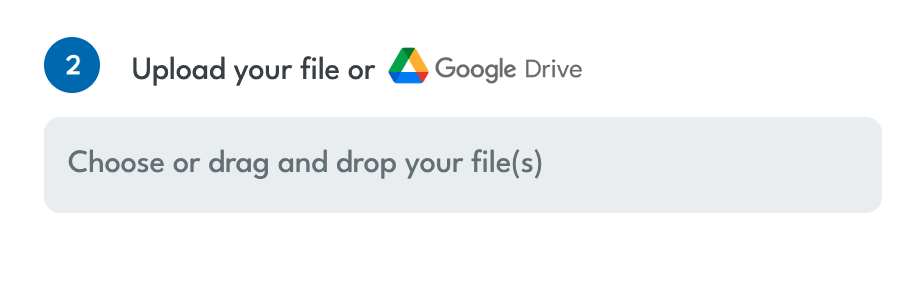
After you log in, choose the IEP document from your computer or your connected Google Drive. Just select your target language and select the file(s) you wish to translate.
If you need to translate multiple IEP documents at once, you can upload them at the same time to translate them all in a batch. This way, you won’t need to perform this step multiple times.
→ Pairaphrase supports Google Docs and 25+ file types, so you don’t need to convert files beforehand.
4. Translate IEP document
After you select the IEP document(s), click “Translate.” You will automatically arrive at a screen with a list of all your Active Files.
When the Status column says “Draft” next to your document, it is ready for any IEP translation edits you want to make. Click the name of the file to move to the next step and/or retrieve the translated IEP document.
Watch the video below for a demonstration.
5. Edit the AI-translated IEP text segments
Once you click the file name, the Pairaphrase interface will display the IEP’s text separated into side-by-side segments. You can make edits to the translated segments and save the edited segments to your Translation Memory for reuse.
Check out more tools available in Pairaphrase in the YouTube Playlist “Pairaphrase Knowledge Base Videos”.
6. Download the IEP translation
To retrieve the full translation of the IEP document, simply select “Download Translation” from the “Actions” menu. The downloaded file reflects the original document structure wherever possible, with Pairaphrase designed to help retain tables, sections, and overall layout.
See first-hand how your school can translate IEP documents safely:

How to translate an IEP collaboratively
To translate IEP documents collaboratively, you can invite colleagues to edit the document.*
Say you want to translate an IEP into Spanish, and there are some segments that need a second look at the Spanish translation. In this case, you can invite a Spanish-speaking colleague to perfect the translation.
If the segments are edited, the improved translation can be saved for future use, so your team never needs to translate the same phrase, sentence, or paragraph twice. Pairaphrase makes this possible using AI and Translation Memory.
How to add colleagues as users in Pairaphrase
*Your Pairaphrase account Admin must first add these users to your school’s Pairaphrase account.Then, just share the file with the user you want to collaborate with. You can tag them in an instant message within Pairaphrase to chat about the project.
→ Related: 6 Tips for Training Administrative Staff on School Document Translation
Why use Translation Memory to translate IEP documents?
Using Translation Memory to translate IEP documents can help schools achieve nearly instant quality improvements and reduce translation costs and effort.
This helps schools maintain consistent language across updated IEPs without re-translating the same FERPA-sensitive content.
Learn about Translation Memory in the 2-minute video below.
Use Pairaphrase’s ChatGPT for an improved IEP translation experience
To further improve the quality of your IEP translations, Pairaphrase has integrated ChatGPT within its secure platform. This way, your administrative staff can harness the power of translating with a large language model (LLM) securely and in compliance with FERPA.
Pairaphrase’s ChatGPT integration is specially-trained for the translation process and leverages GenerativeAI (GenAI) to deliver a better translation experience than using ChatGPT outside of the Pairaphrase platform.
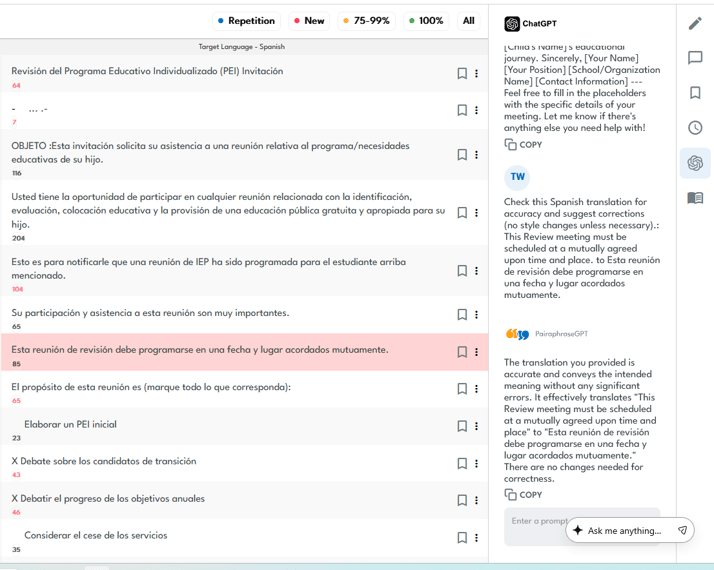
Pairaphrase’s AI Translation agent in action
Improve school document management with Pairaphrase’s Google Drive integration
Pairaphrase has also integrated Google Drive into the platform, which allows your school district to implement seamless multilingual school document management and collaboration.
This integration means you can access, translate, and save IEP documents stored in Google Drive without additional downloading or uploading steps.
This streamlined process will also help your team save time and enhance the security and integrity of your documents by keeping them within a trusted environment.
Translate IEP meetings in real time with PairaVoice
IEP communication doesn’t stop at documents. Your school also needs a secure way to translate IEP meetings so parents can participate fully in real-time conversations about their child’s education.
PairaVoice is a secure speech-to-speech translation and transcription app designed specifically for IEP meetings and family communication.
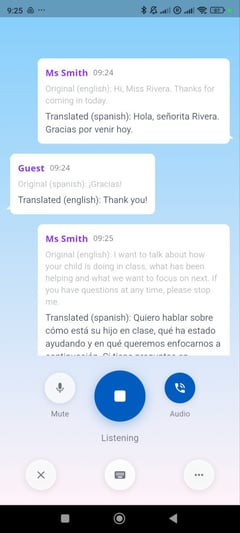
How do schools benefit from PairaVoice?
With Pairavoice, schools no longer have to rely on a human IEP meeting interpreter, which can be costly and difficult to schedule, nor on consumer apps that introduce privacy risks.
PairaVoice enables real-time, two-way multilingual conversations while protecting student data. All communication is handled in a FERPA-compliant environment built for schools.
→ Learn more about PairaVoice.
Conclusion
Translating IEP documents requires more than simple translation. It requires security, accuracy, and tools that fit into how schools actually work. These same standards matter across broader education translation workflows, where accuracy, terminology consistency, and student data protection are essential.
With secure document translation and workflows designed for administrators, Pairaphrase helps schools communicate clearly while protecting student data.
A secure and easy-to-use translation tool for IEP documents
If your school needs a secure way to translate IEP documents without compromising FERPA compliance, Pairaphrase provides a safer, smarter path forward.
FAQ
Do IEPs have to be translated for parents?
IEPs do not always have to be translated word-for-word, but schools must ensure parents meaningfully understand their child’s IEP. Many districts translate IEP documents for parents with Limited English proficiency to meet civil rights requirements.
What law requires schools to translate IEPs or IEP meetings for parents?
Federal civil rights laws require schools to provide meaningful access to information for parents with limited English proficiency, including language assistance for IEP meetings and related documents.
How can school staff obtain translation for an IEP?
School staff can obtain IEP translation through professional IEP translation services or secure, FERPA-compliant translation software like Pairaphrase that allows districts to translate documents internally.
What do schools need to translate for an IEP?
Schools typically translate the full IEP, including goals, services, accommodations, placement details, and parent rights, along with related notices and consent forms when needed.
How do I translate an IEP document securely?
To translate an IEP document securely, schools should use FERPA-compliant translation tools rather than free online translators. Pairaphrase encrypts student data and protects sensitive information throughout the IEP translation process.
How can I translate an IEP into Spanish?
Schools can translate an IEP into Spanish using secure education-focused translation software like Pairaphrase, which ensures accuracy while keeping student records confidential.
How do schools translate IEP meetings?
Schools translate IEP meetings by providing interpreters or using secure real-time speech translation tools. Pairaphrase’s PairaVoice app supports live transcription and voice translation for IEP meetings while protecting sensitive conversations.
What are IEP translation services?
IEP translation services help schools translate Individualized Education Program documents accurately and securely. Platforms like Pairaphrase combine AI translation with FERPA-aligned workflows for education use.
Recommended IEP Translation Software
Want to get started with the best IEP translation software? Try Pairaphrase. It’s the AI Translation Management System for teams that value smarter, faster, and safer translation.

Pairaphrase supports 160+ languages and 27,000+ language pairs. Translate an IEP into Spanish, English, French, German, Arabic, Hindi, Chinese, Japanese, and more. Not to mention, Pairaphrase performs file translation for 25+ file types.
Just one translation with Pairaphrase can cover your annual subscription!
Get Started
Schedule a demo or share this article with a colleague.
“Pairaphrase has been a game-changer for us. We can provide translated documents to our parents in a matter of minutes instead of days or weeks.”
- Carla McCluskey, Executive Secretary, Dayton Public Schools

Reviewed by

Founder and CTO
He is Co-Founder and CTO of Pairaphrase and a leader in translation technology with more than two decades of experience improving how organizations communicate across languages. His work focuses on making multilingual communication more accurate, efficient, and accessible through AI-driven translation solutions, practical innovation, and a strong emphasis on usability, quality, and security.