


/PairaVoice-Start-A-Conversation-nobg-md.png?width=200&height=300&name=PairaVoice-Start-A-Conversation-nobg-md.png)













Translation Editor for Machine-Translated Files
Pairaphrase helps teams securely review, edit and finalize AI- or machine-translated files with segment-level editing, AI assistance, Translation Memory, glossaries and governed human review workflows.


Edit translated files securely · Review by segment · Use AI + human review · Apply glossaries · Save approved edits to TM

How the Pairaphrase Translation Editor helps teams
Pairaphrase gives teams a secure, practical way to move machine-translated and AI-translated files from first draft to final review.

Edit & refine
Edit translated content segment by segment to improve accuracy, readability, tone and fluency.

Review & approve
Support human review by your team before final delivery with side-by-side source and target text, workflow controls and reviewer access.

Improve formatting fit
Use character count, segment merging and layout-aware editing to reduce formatting issues caused by language growth.

Reuse approved edits
Save reviewed segments to Translation Memory so future translations can become more consistent and efficient.
Hybrid Machine Translation Workflows with AI + Human Review
Pairaphrase helps teams turn Machine Translation and AI translation output into reviewed, approved content by combining AI-assisted post-editing, team review, glossaries and Translation Memory in one secure, controlled workflow.

Translation editing tools included in Pairaphrase
Pairaphrase includes editing and review tools that help teams improve machine-translated and AI-translated files before exporting final translations.
Segment-level translation editing
Edit translated text by segment so reviewers can focus on the exact sentence, phrase or section that needs improvement.
AI-assisted refinement
Use built-in AI tools to regenerate a segment, improve fluency, explore alternate phrasing or shorten text for layout constraints.

Translation quality review
Review translated segments for accuracy, fluency, readability, terminology consistency and formatting fit before final delivery.

Character count and layout-aware review
Compare source and target character counts to identify language growth, text expansion and formatting risks before exporting the final translated file.
Translated file preview before download
Preview the translated file to review layout, formatting, readability and text presentation before downloading the final version.

Segment merging
Merge adjacent segments when file formatting splits sentences unnaturally, helping translations read more clearly and naturally.

Glossary and terminology support
Use approved terms, product names and regulated language to improve consistency across reviewed translations

Translation Memory updates
Save approved edits to Translation Memory so reviewed translations can support future consistency and reduce repeated work.
File export and analysis
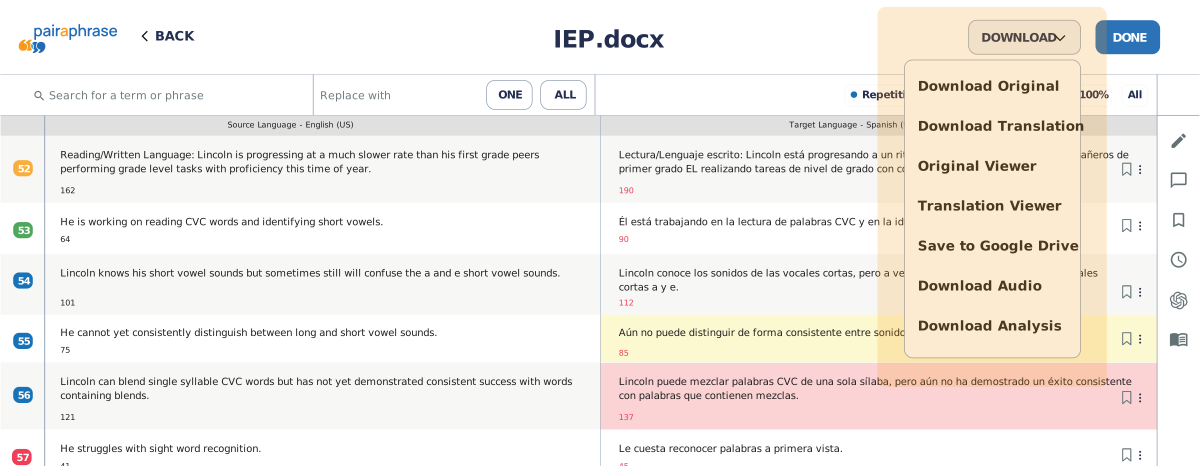
Download translated files, original files, post-OCR files, translated outputs or analysis reports from the Translation Editor.

How to edit machine-translated files in Pairaphrase
Pairaphrase keeps Machine Translation post-editing, human review, Translation Memory updates and file export inside one platform.
We offer guided onboarding, easy setup and a short learning curve for teams deploying managed translation review workflows.
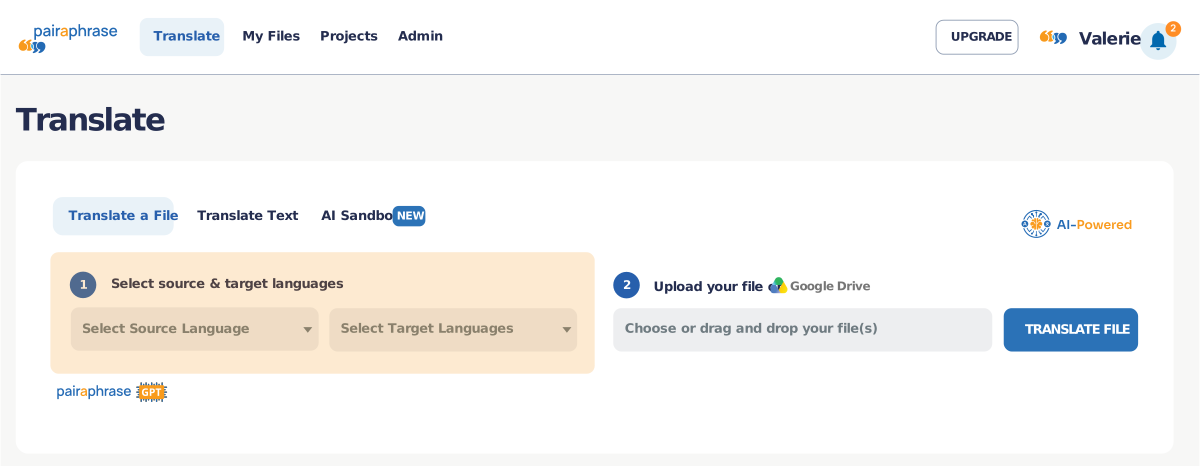
1. Upload and translate your file
Start with a file translated through Pairaphrase using a supported AI or Machine Translation engine.
2. Open the file in the Translation Editor
Review source and target content side by side in a segment-based editor.
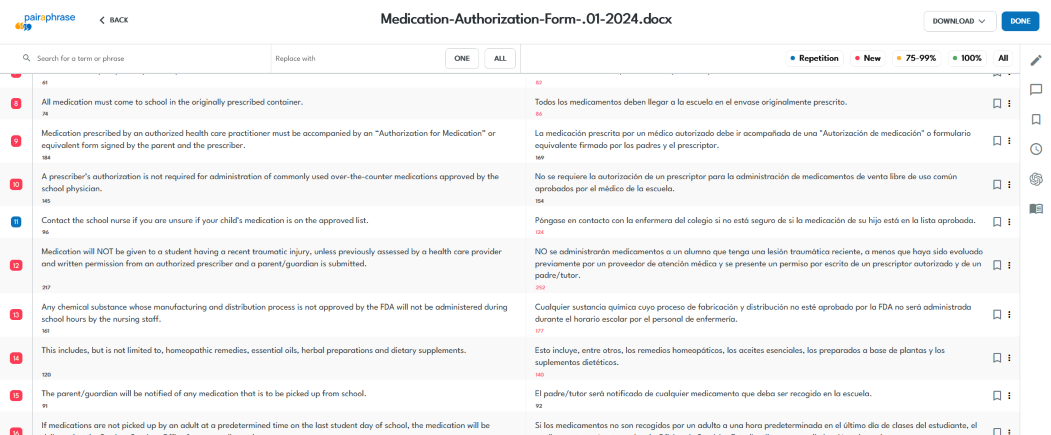
3. Edit translated segments
Improve wording, fix errors, adjust terminology, merge segments or use AI-assisted actions for alternate phrasing.
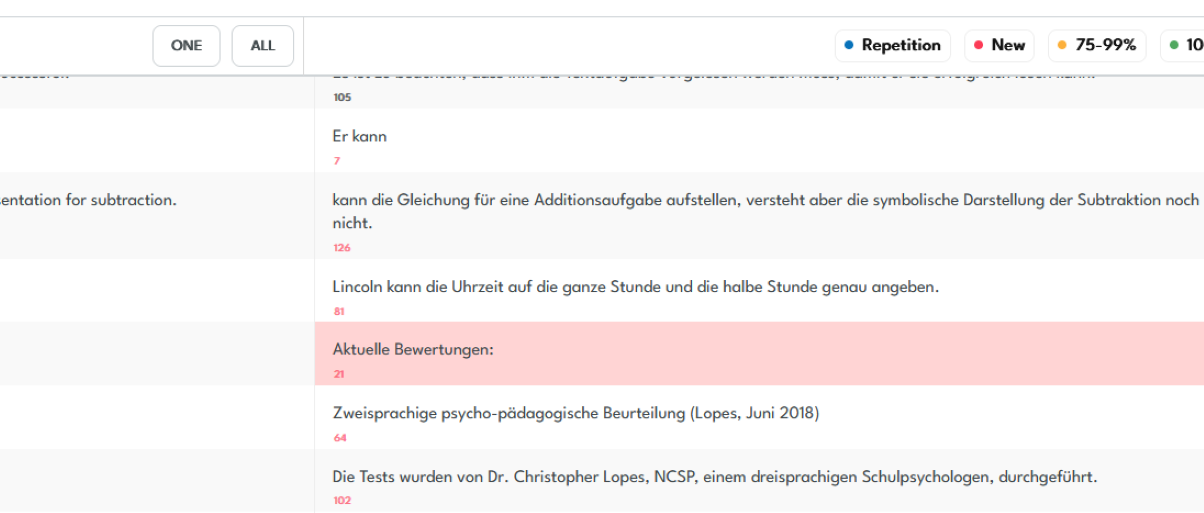
4. Review with your team
Share files with reviewers, translators or subject matter experts when human approval is needed. Collaborate in real-time by utilizing the chat function within the editor.
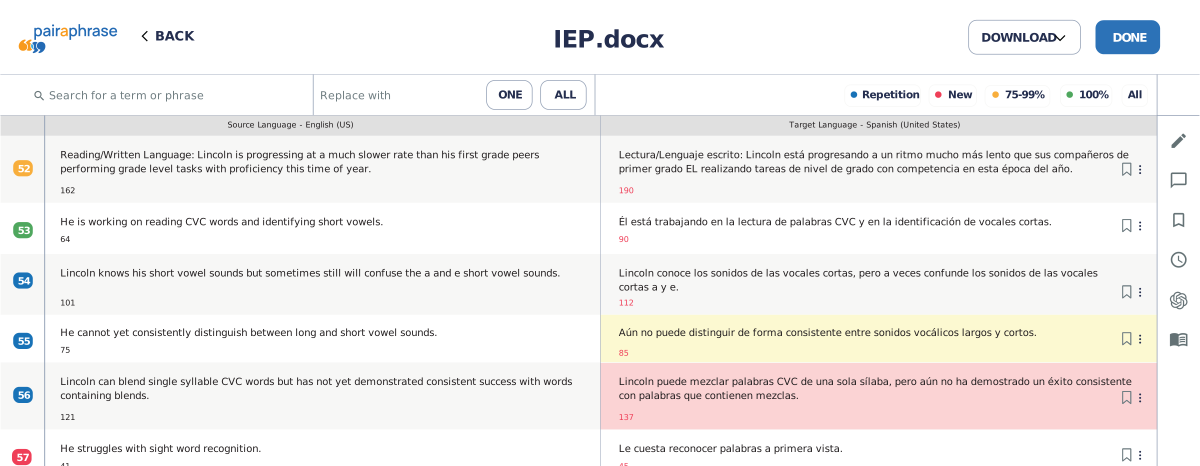
5. Save approved edits
Save changes to Translation Memory so future translation workflows can reuse approved language.
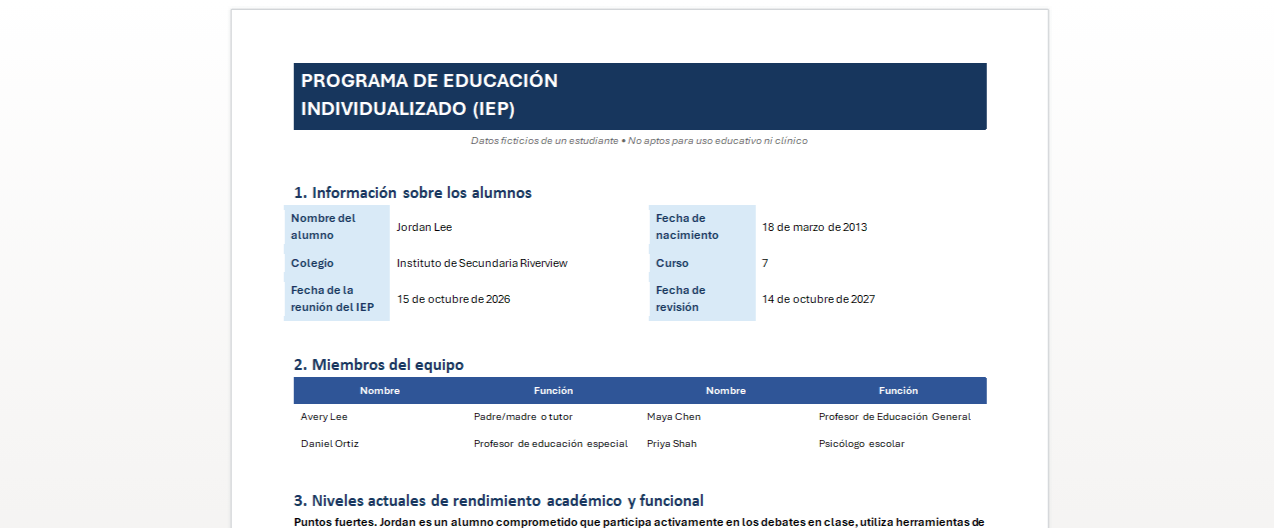
6. Preview the translated file
Review layout, formatting, readability and text presentation before downloading the final translated file.
7. Export the final file
Download the polished translation, export an analysis report or save to Google Drive.


See how teams edit and review translated files in Pairaphrase
See how reviewers edit translated segments, use AI assistance, check character count, preview layout and export the final file.

Pairaphrase translation editor vs. disconnected editing workflows
Generic editing tools can help reviewers make changes, but they are not designed for translation post-editing, segment-level review, Translation Memory updates or formatted file export.
Bring post-editing into a controlled review workflow with Pairaphrase.
What users notice about Pairaphrase translation editing workflows
Results from stronger translation review workflows
Pairaphrase case studies show how organizations improve translation turnaround, reduce manual review work and keep multilingual content under stronger workflow control.

Carestream Dental
Health / Dental Technology
Documentation translated, reviewed and finalized within 15 days
- 80% lower translation cost
- $13,900 saved annually
- 300+ hours saved annually
Quality outcome: Carestream Dental used a hybrid translation process where AI-assisted translation supported first drafts and internal reviewers controlled final technical accuracy.

Aquatrols
Manufacturing / Global Product Communications
2,000+ hours saved annually
- 96% lower translation cost
- $45,000 saved annually
- 50,000 words translated per month
Review outcome: Aquatrols improved distributor review workflows for regional accuracy, cultural relevance and regulatory communication across global markets.

Pleasanton Unified School District
Schools / K–12 Education
3-week document turnaround eliminated
- 93% lower translation cost per word
- $186,000 saved annually
- 800+ staff hours saved per year
Workflow outcome: Pleasanton moved high-volume school translation into a secure, cloud-based workflow that helped staff deliver multilingual communication faster.

Common translation editing workflows Pairaphrase supports
Use the Pairaphrase translation editor to review, refine and finalize translated content before delivery.
Post-editing machine-translated files
Review and improve machine-translated content for accuracy, fluency, terminology and readability before it is shared, published or delivered.
Reviewing LLM- and AI-translated files
Review content translated or drafted with ChatGPT, Claude or other LLM workflows inside Pairaphrase before final use.

Refining technical and product translations
Improve translated manuals, product guides, help center content, knowledge base articles and technical documentation before release.
Adjusting marketing and campaign translations
Refine translated campaign copy, landing page text, email content and regional messaging for tone, brand voice and audience fit.

Reviewing training and internal enablement content
Edit translated training materials, onboarding content, internal guides and learning resources before they are distributed to employees, partners or customers.

Correcting terminology in sensitive communications
Review translations that require approved terminology, consistent phrasing or subject matter expertise before final use.

Editing translations for layout and character limits
Use character counts and segment-level edits to reduce layout issues caused by translated text expansion.
Preparing translated files for final delivery
Finalize reviewed translations, save approved edits to Translation Memory and export translated files from Pairaphrase.Related Pairaphrase product capabilities
Pairaphrase’s translation editing tool works with related translation management capabilities that support file handling, content reuse, terminology consistency and team review.

Document Translation
Translate files before reviewing them in the file translation editor.
AI Translation Tools
Generate or edit translations with PairaphraseGPT, AI Sandbox, and AI Translation Agents.


Terminology Management
Maintain approved terms, product names and regulated terminology with glossary tools.
Collaborative Translation
Invite teammates to review, comment and manage edits inside shared translation workflows.

Automatic File Formatting
Preserve file layout where supported and reduce manual formatting cleanup.
Integrations
Connect Pairaphrase with tools your team already uses, including Google Drive, Slack, Canva, Google Workspace, ClassLink, Okta, and more.

Translation API
Connect translation workflows with your own systems, platforms, or applications.
Why teams choose Pairaphrase for translation review
Pairaphrase is built for teams that need to review machine-translated or AI-translated files with more control than manual editing tools can provide.

Better review control
Review translated files by segment, keep source and target text aligned, and manage edits before final export.

More consistent translations
Apply approved terminology and save reviewed edits to Translation Memory so recurring content becomes easier to manage.

Less disconnected work
Keep AI-assisted refinement, human review, file export and approved translation reuse inside one workflow instead of moving between spreadsheets, documents or public AI tools.

Stronger governance for sensitive content
Use controlled access, reviewer workflows and secure file handling for teams reviewing business-critical or compliance-sensitive translations.

Fewer formatting surprises
Use character count controls, layout-aware review and translated file preview to catch text expansion, readability issues and formatting risks before final delivery.
Supported content and files
Pairaphrase’s document translation editor supports review and post-editing workflows across many translated file types and content categories.
Common files teams review after translation
- Word documents
- PowerPoint presentations
- Excel files
- Google files
- Digital PDFs
- Scanned documents
- Canva-based content
- IDML / InDesign files
- XLIFF files
- Subtitles, labels and layout-sensitive content
For the complete list, see Pairaphrase supported file types.
Who Pairaphrase’s translation editor is for
Pairaphrase’s translation editor tool supports teams that need the right reviewers, subject matter experts or department stakeholders to approve translated content before final delivery.

Localization teams
Coordinate translation review across internal teams, regional stakeholders and subject matter experts while keeping edits, approvals and final delivery inside Pairaphrase.

Translators and reviewers
Edit source-aligned translation segments, improve fluency, correct terminology, use AI-assisted refinement and prepare translated files for approval or export.
Healthcare teams
Bring clinical, compliance, operations or administrative reviewers into the translation review process when terminology, accuracy and sensitivity matter.
Education teams
Route translated school communications, family notices, training materials and student-related documents to administrators, multilingual staff or program leads for review.
Language service providers
Manage client reviewer feedback, post-editing workflows, terminology corrections and final delivery across recurring translation projects.
Legal and compliance teams
Review sensitive translations with the right stakeholders before contracts, policies, disclosures or compliance-sensitive communications are finalized.

Marketing teams
Route translated campaign content through brand, regional, channel or product reviewers before publishing.
Technical documentation teams
Give product owners, engineers and technical subject matter experts a structured way to review translated documentation before release.
.png?width=25&height=25&name=team-(2).png)
Administrative and HR teams
Review translated employee notices, policies, forms, internal updates and cross-department communications before sharing them across the organization.
Secure, governed translation editing workflows
Pairaphrase helps teams keep translation editing, review, and export inside a secure, governed workflow instead of relying on email, spreadsheets or unmanaged AI tools.
Security and governance features include:
- Role-based access control (RBAC)
- Secure file handling
- Translation activity visibility
- Audit-friendly reporting
- Controlled review workflows before final use
- Translation Memory and glossary governance
- Secure collaboration for reviewers and subject matter experts
- Compliance-aligned workflows for sensitive multilingual content
For more detail, see how Pairaphrase handles customer content across AI Sandbox and Translation Engine workflows.
See Pairaphrase Translation Editor in action
Ready to review and refine machine-translated files with more control? Pairaphrase helps teams edit, review, approve and reuse translated content inside a controlled translation workflow.
See how Pairaphrase Translation Editor supports post-editing, human review, Translation Memory updates and final file delivery.