

/PairaVoice-Start-A-Conversation-nobg-md.png?width=200&height=300&name=PairaVoice-Start-A-Conversation-nobg-md.png)




















.png)

.png)


 ChatGPT
 Google AI
 Perplexity
 Claude
 Grok
GrokIf your team uses Claude Skills for translation and localization, you’re ahead of the curve for language translation productivity. Claude Skills can help standardize translation workflows inside a broader AI translation strategy, improve terminology consistency, and reduce repetitive setup work.
Instead of rebuilding the same translation instructions for every launch, localization teams can save reusable Skills for glossary control, localization QA, OCR cleanup, UI strings, and multilingual SEO. You’ll enjoy faster workflows with more consistent output.
This guide walks through 9 custom Claude Skills for translation and localization workflows that you can copy into Claude today. We’ll also review when it makes sense to move from reusable AI workflows into a dedicated translation workflow platform.
What are Claude Skills for translation?
Claude Skills for translation are saved reusable instruction sets that standardize recurring localization workflows.
If your team is still in the prompt-design phase, our guide to ChatGPT prompts for translation is a useful starting point before evolving those workflows into reusable Claude Skills.
This includes glossary enforcement, SEO metadata localization, OCR cleanup, UI string localization and translation QA. They help teams avoid rebuilding the same prompts for every project.
Are there pre-built Claude Skills for translation?
Claude offers pre-built Skills for working with files like Word documents, spreadsheets, presentations, and PDFs, but not specialized translation workflows.
Most localization teams need to create custom Claude Skills for terminology control, OCR cleanup, UI strings, multilingual QA, and regulated content review.
How to create translation Skills for Claude with /skill-creator
The easiest way to turn the instructions below into reusable Claude Skills is to use Claude’s /skill-creator command. The skill-creator helps you build and refine custom Skills interactively, so you do not need to manually structure every Skill from scratch.
Here’s the simple workflow:
-
Open Claude and type
/skill-creator -
Tell Claude which workflow you want to build, such as “Create a Skill for terminology-controlled translation”
-
Copy the relevant Skill Name and instructions from one of the examples below
-
Ask Claude to turn those instructions into a reusable Skill
-
Review the Skill, test it with sample translation content, and refine the instructions as needed
-
Save the Skill so your team can reuse the same workflow consistently
Example: creating a translation Skill in Claude
For example, you could type:
“/skill-creator Create a Skill called Terminology Lock Translator. The Skill should translate content while preserving approved glossary terms, product names, legal phrases, and regulated terminology exactly as written.”
Then paste the corresponding instructions from the section below. This gives your team a faster, more consistent way to apply the same translation rules across projects.
Dive deeper into general skill-building: The Complete Guide to Building Skills for Claude
9 Custom Claude Skills for Translation & Localization Workflows
The following 9 custom Claude Skills for translation were developed by a language translation specialist to help you utilize the full potential of Claude for translation quality and productivity.
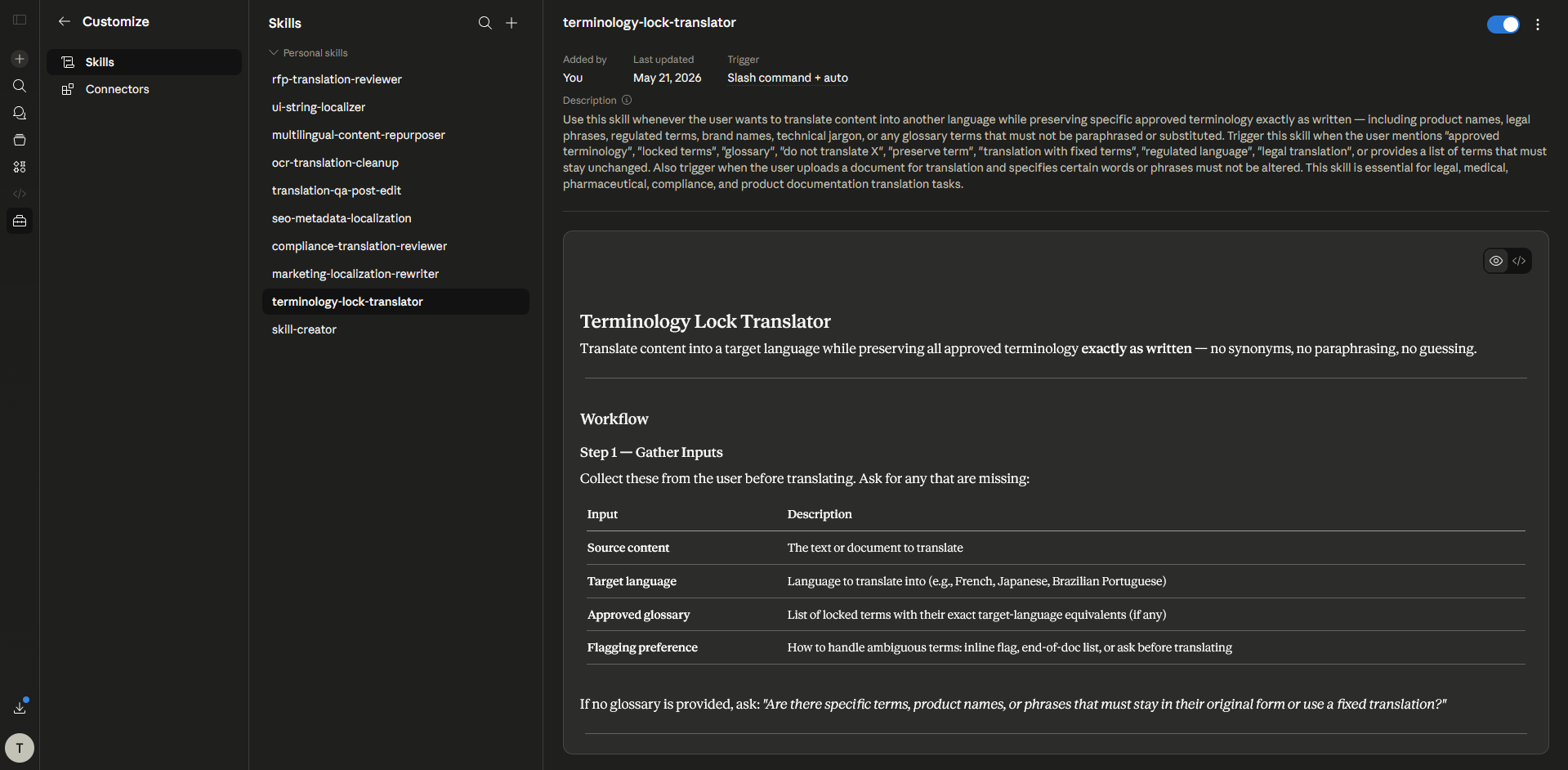
1. Terminology Lock Skill
This Claude Skill helps preserve approved terminology across regulated, technical, and enterprise content.
Skill Name: Terminology Lock Translator
Instructions to paste into Claude Skill setup:
Translate the provided content into the target language while preserving all approved terminology exactly as written.
Rules:
Never replace glossary terms with synonymsPreserve product names, legal phrases, and regulated terminologyMaintain sentence meaning without altering approved termsIf a term is unclear, flag it instead of guessingKeep formatting structure in the output
2. Marketing Localization Skill
This Claude Skill is ideal for campaign copy, landing pages, and multilingual demand generation content.
Skill Name: Marketing Localization Rewriter
Instructions to paste into Claude Skill setup:
Translate and localize the content for native-level marketing performance.
Rules:
Adapt idioms naturally for the target marketPreserve CTA clarity and conversion intentKeep the brand voice professional and persuasiveRewrite headlines for local readability if neededPrioritize message impact over literal translation
3. Regulated Translation Review Skill
Use this Claude Skill to support review workflows for compliance-sensitive content.
Skill Name: Compliance Translation Reviewer
Instructions to paste into Claude Skill setup:
Review the translated content for compliance-sensitive risks.
Check for:
altered legal meaningchanged medical or educational terminologyomissions in warnings or disclaimerstone shifts that affect policy interpretationinconsistent terminology usage
Flag risky segments with suggested corrections.
4. SEO Metadata Localization Skill
This Claude Skill helps multilingual SEO teams localize search-facing assets without rebuilding prompts.
Skill Name: SEO Metadata Localization
Instructions to paste into Claude Skill setup:
Translate SEO elements for the target language while preserving search intent.
Requirements:
keep primary keyword prominencepreserve CTR language in meta descriptionsmaintain title tag readabilitylocalize image alt text naturallyadapt CTA language for local search behavior
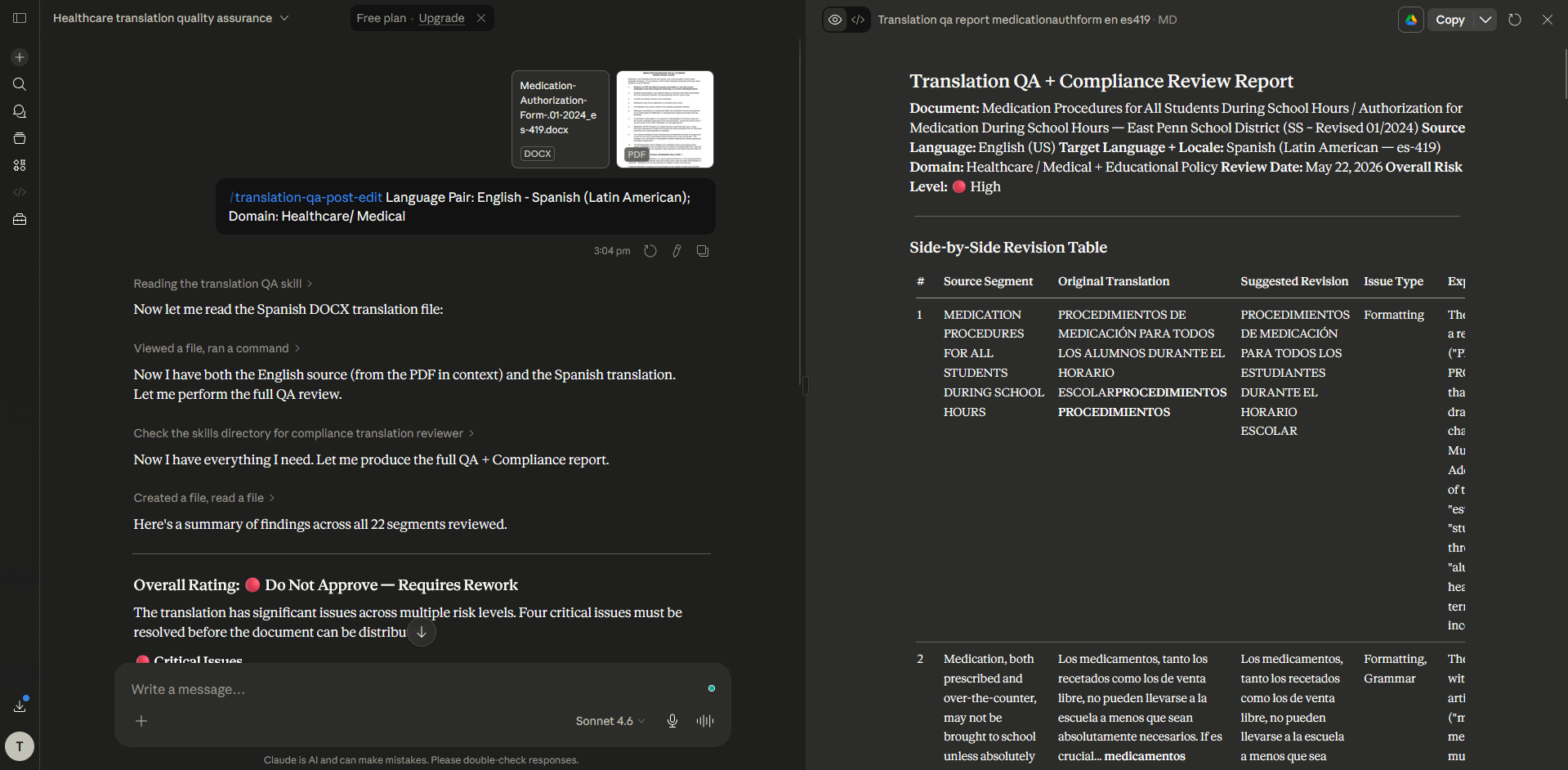
5. Translation QA Skill
This is a strong reusable workflow for localization managers and LSP reviewers.
Skill Name: Translation QA + Post Edit
Instructions to paste into Claude Skill setup:
Review the translation for:
fluencyterminology consistencygrammarmissing segmentsformatting mismatchesunnatural phrasing
Output corrections in a side-by-side revision format.
6. OCR Translation Cleanup Skill
This Claude Skill is useful for scanned PDF translation and OCR-derived document content.
Skill Name: OCR Translation Cleanup
Instructions to paste into Claude Skill setup:
Review OCR-translated text for:
broken line breakssplit wordsincorrect table row orderheader/footer duplicationscanned PDF artifactsmissing characters
Preserve the original document's meaning while improving readability.
7. Multilingual Case Study Repurposing Skill
This Claude Skill helps marketing and product teams adapt customer proof points across markets.
Skill Name: Multilingual Content Repurposer
Instructions to paste into Claude Skill setup:
Translate and adapt this customer story into:
landing page copyLinkedIn postcase study summarysales enablement one-pagerregional email nurture copy
Maintain proof points, metrics, and trust language.
8. UI String Localization Skill
This Claude Skill is ideal for product teams localizing software interfaces.
Skill Name: UI String Localizer
Instructions to paste into Claude Skill setup:
Translate UI strings while preserving:
variable placeholderscharacter limitsbutton claritymobile readabilityerror-state precisionfeature naming consistency
Flag strings that may overflow UI layouts.
9. RFP / Procurement Translation Skill
This Claude Skill supports enterprise procurement, legal, and vendor evaluation workflows.
Skill Name: RFP Translation Reviewer
Instructions to paste into Claude Skill setup:
Translate procurement and RFP documents while preserving:
legal intentcompliance terminologysecurity questionnaire languagepricing structure wordingvendor requirement precision
Flag ambiguous clauses for human review.
Where Claude Skills fall short for translation teams
Claude Skills are excellent for making translation prompts reusable, but they are still manual workflows.
Teams quickly run into friction with:
- document formatting preservation
- OCR for scanned PDFs
- Translation Memory reuse
- glossary governance at scale
- multilingual batch file translation
- permission controls
- secure collaboration
- auditability
- compliance
- centralized editing workflows
At that point, the team would no longer be solving a prompt problem. They would then need to move toward solving a translation operations problem.
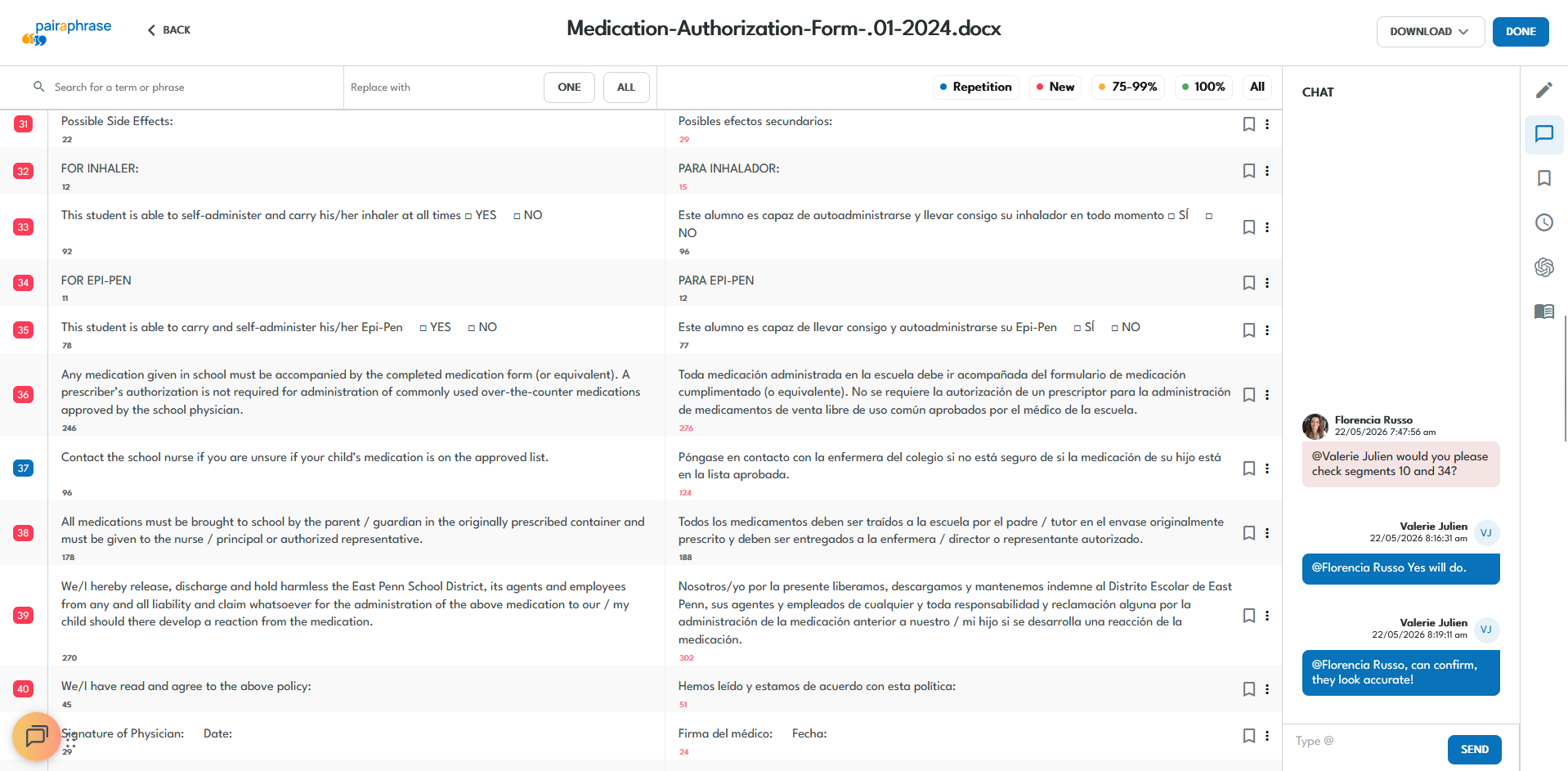
Collaborative translation in Pairaphrase
When to move to Pairaphrase
Claude Skills are useful for lightweight content transformation and repeatable prompting logic. Pairaphrase becomes the smarter choice when your workflow needs the following built in:
- Translation Memory for persistent reuse
- Terminology Management across teams & vendors
- OCR for scanned PDFs with ABBYY
- automatic file formatting
- batch document translation
- secure collaboration across linguists, reviewers & stakeholders
- side-by-side translation editing
- Agentic translation workflows
- AI Sandbox for writing assistance
- multiple AI translation engines & LLM options
- enterprise-grade permissions & controls
- alignment with HIPAA, FERPA, GDPR, SOC-2 Type-2 or PCI-DSS
- auditability for regulated environments such as education & healthcare
- file parsing in order to maintain tag structure and avoid burning through tokens while translating XML files, localizing JSON files, etc.
Teams making this transition have seen measurable gains.
For example, according to a case study by Pairaphrase, one Pairaphrase customer saved 300+ hours annually, reduced translation costs by 80%, and saved $13,900 per year on JSON, XLIFF, and DOCX translation workflows.

For teams translating business-critical documents, this is where a translation workflow platform outperforms saved AI skills.
Experience the Best Alternative to Claude Skills for Localization & Translation Workflows
If your Claude Skills are evolving into repeatable translation SOPs, Pairaphrase helps localization teams operationalize those workflows.

Get Translation Memory, glossaries, OCR, automatic file formatting, secure collaboration, translation editing, PairaphraseGPT (translation agent), API access and enterprise-ready compliance controls.
Schedule a Demo or explore Pairaphrase’s AI translation workflow capabilities.
FAQ
How do you translate large documents in Claude without hitting token limits?
The most efficient way to translate large documents in Claude is to upload PDFs, TXT, or DOCX files into a Claude Project, where cached project knowledge and RAG can expand capacity by up to 10x. This reduces repeated token usage compared with pasting text into chat.
For extremely long translations, use the Claude API with the Files API or pay-as-you-go usage, which lets you reuse uploaded files across requests without re-uploading the same content.
If the file still exceeds practical chat length, split it into logical sections and translate incrementally to preserve context and reduce truncation risk.
What’s the difference between Claude Skills and prompts for translation?
Prompts are one-time instructions. Claude Skills are saved reusable workflow modules your team can relaunch consistently.
Are there pre-built Claude Skills for translation?
Claude includes file-based pre-built Skills, but translation teams typically need custom Skills for glossary workflows, QA, OCR cleanup, and localization-specific SOPs.
When should a localization team move to a translation workflow platform?
Once repeatable Skills expose the need for Translation Memory, glossary governance, OCR, document formatting retention, secure collaboration, permissions, and multilingual file workflows.
Can Claude Skills handle OCR workflows?
They can help clean OCR-derived text, but scanned PDFs and layout-sensitive document workflows are usually better handled in a dedicated platform like Pairaphrase.
Can Claude Skills replace a TMS?
They are excellent for repeatable prompting logic, but not for persistent multilingual workflow governance, compliance, and secure collaboration at scale.
"We found with Pairaphrase a way to master translation costs through a dedicated subscription plan. This tool allows us to focus on reviews, and time is also under control. Pairaphrase team is always listening to feedback and regularly provides solutions and enhancements of the tool. Thank you. "
- Jean-Philippe Quint, Technical Training Engineering & Technical Communication, Carestream Dental