

/PairaVoice-Start-A-Conversation-nobg-md.png?width=200&height=300&name=PairaVoice-Start-A-Conversation-nobg-md.png)
















.png)

.png)

 ChatGPT
 Google AI
 Perplexity
 Claude
 Grok
GrokEnterprise PDF translation is a different problem than “translate this paragraph”. The best AI PDF translator has to handle the realities of enterprise PDFs.
You’re dealing with scanned PDFs, multi-column layouts, tables/forms, repeat content, strict terminology, and compliance—often at high volume.

This guide breaks down what enterprise teams should look for (and what to avoid) so you can choose an AI PDF translation tool that’s secure, scalable, and reliable in real workflows.
The best AI PDF translator for enterprise teams is the one that protects sensitive data, preserves layout, supports OCR, and gives you governance (roles, logs, SSO), not just “good translations.”
Why take our advice on AI PDF translation?
As translation industry veterans with a keen interest in AI translation, we’ve tested many AI-powered PDF translators. In fact, we’ve spent years working through the real challenges of PDF translation, including scanned documents, complex layouts, and multilingual formatting.
So today, we base this guide on current vendor documentation, plus what enterprise buyers consistently prioritize:
- security posture
- workflow controls
- OCR/layout performance
- integration fit
We also reference real-world outcomes by Pairaphrase customers (e.g., school districts and global teams reducing turnaround time and costs) when we develop our products.

What makes an AI PDF translator enterprise-grade?
An “enterprise-grade” PDF translator means governance + repeatability + risk control. A strong enterprise PDF translation stack usually includes:
- Security & compliance alignment (encryption, admin controls, SSO/MFA; clear data-use policies)
- OCR for scanned PDFs (so scans, photos, and image-based PDFs are actually translatable)
- Layout & formatting preservation (tables, columns, headers, forms—plus predictable exports)
- Workflow & collaboration (assignments, review/approval steps, auditability)
- Role-based access control (RBAC): permissions by role (admin, translator, reviewer, viewer)
- Translation Memory + terminology (consistency across recurring PDFs, less rework)
- Integrations & API (Google Drive, batch pipelines, automations)
- Support & SLAs (especially for regulated or customer-facing docs)
Why translating PDFs is so challenging
PDFs weren’t designed for translation, they’re designed to “look the same everywhere,” which makes text extraction, OCR, and layout retention hard.
PDFs are visually consistent, but that consistency comes from fixed layout rules that don’t translate cleanly into editable text. In most workflows, three issues cause most of the pain:
1. Scanned PDFs complicate translation.
Scanned PDFs are image-based, meaning they’re essentially pictures of text. Without optical character recognition (OCR), your AI translator can’t even begin to read the content.
2. Layout preservation is critical.
From brochures to user manuals, PDFs often include finalized layouts and elements such as tables, images, and custom fonts. A poorly-designed AI PDF translator might wreck the formatting, creating hours of manual rework.
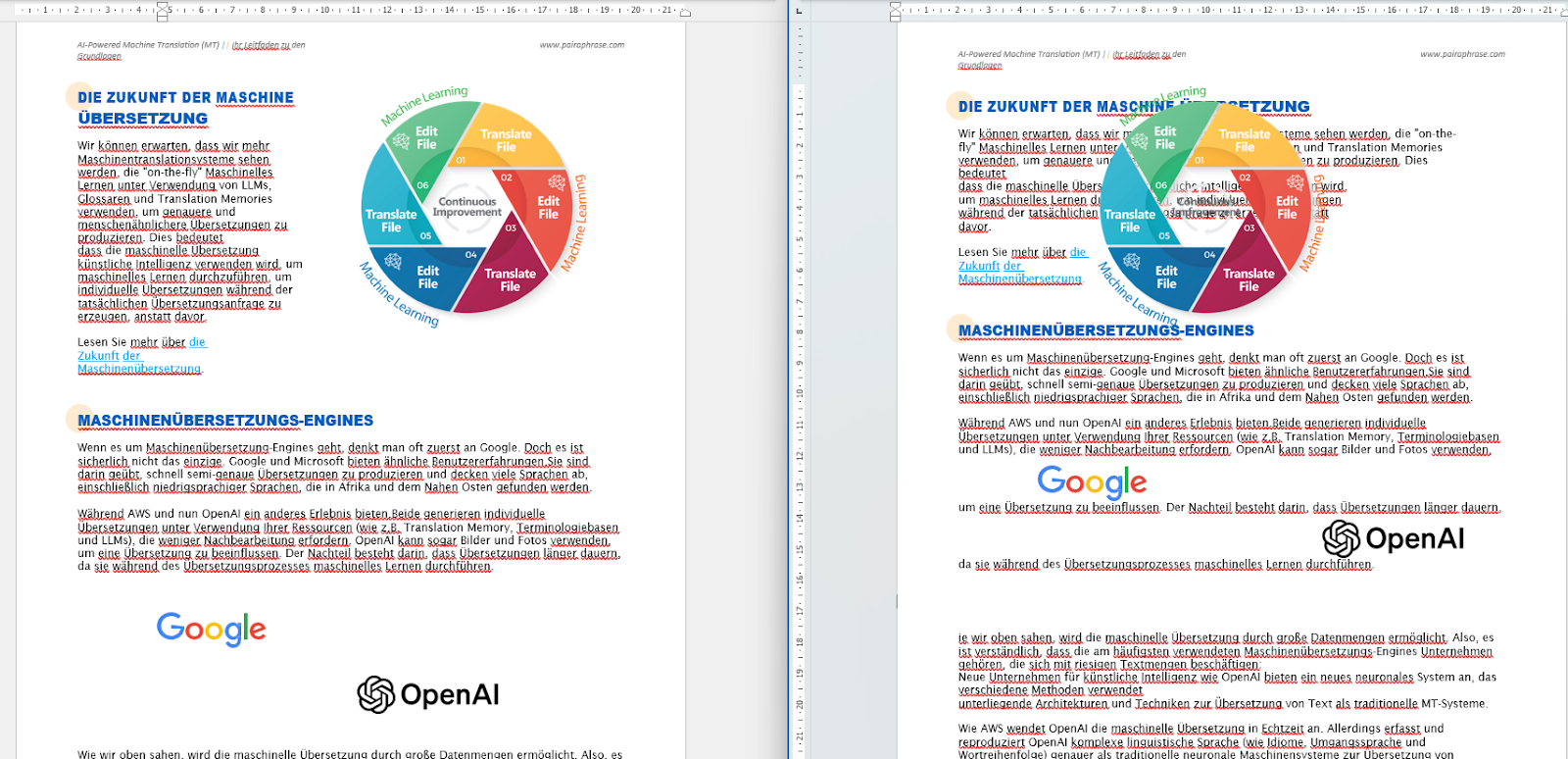
3. Language growth disrupts layouts.
Translating to languages with longer phrases (like German or French) often expands the text, causing layout issues. Without intelligent formatting tools, you risk losing the polished look of your original document.
Why free AI PDF translators fail enterprise requirements
Most “free” PDF translators are optimized for convenience. They’re not designed for compliance, controls, or repeatable quality.
Common gaps you’ll run into with free AI PDF translators:
- Unclear data practices (retention, logging, model training stance, subprocessors) — if it’s not documented, assume risk.
- No Translation Memory (TM)/glossary/workflow — inconsistent terminology, higher post-edit burden.
- Weak OCR or broken layout — especially with forms, multi-column PDFs, stamps, and low-quality scans.
- Limited admin controls — no SSO, limited permissions, weak auditability
- Shadow-AI risk — teams copy/paste sensitive text into consumer tools when they can’t translate securely in-workflow.
AI PDF translator features enterprise teams should prioritize
TL;DR: Enterprise teams need OCR + layout fidelity + governance + reuse (Terminology Management) and not just a “translate” button.
1. OCR for scanned document translation
If you're going to need to translate scanned PDF documents, the best AI PDF translator will always include OCR (Optical Character Recognition). Translating scanned PDF documents often poses considerable challenges. This is because it needs to be readable by OCR.
In result, if your PDF translator can’t achieve high-quality OCR, it will result in a poor translation. Read more about using OCR for translation to get the best results. Otherwise, your translated scanned document might contain text that looks like gibberish.
2. Machine Translation powered by artificial intelligence
At the core of any AI PDF translator is its Machine Translation capability. Enterprise teams should look for AI-powered translation that goes beyond word-for-word substitution to deliver accurate, context-aware results across full documents.
The best AI PDF translation software uses advanced artificial intelligence to improve quality over time, handle complex sentence structures, and adapt to different content types.
This approach supports high-quality translation from corporate policies to technical manuals and legal documents. As a bonus, some enterprise platforms provide built-in access to ChatGPT-style assistance, allowing users to refine translations directly (more on this next).
3. ChatGPT integration
A ChatGPT integration can serve as a powerful translation assistant, especially when it’s available directly inside your PDF translation workflow.
Instead of switching between tools, you can use ChatGPT in-app to handle common translation challenges such as tricky sentence structure, compound terms, or awkward phrasing.
This “translation assistant”, per se, can also generate alternative translations for idioms or culturally specific language, helping you choose the best fit for your audience without leaving the platform.
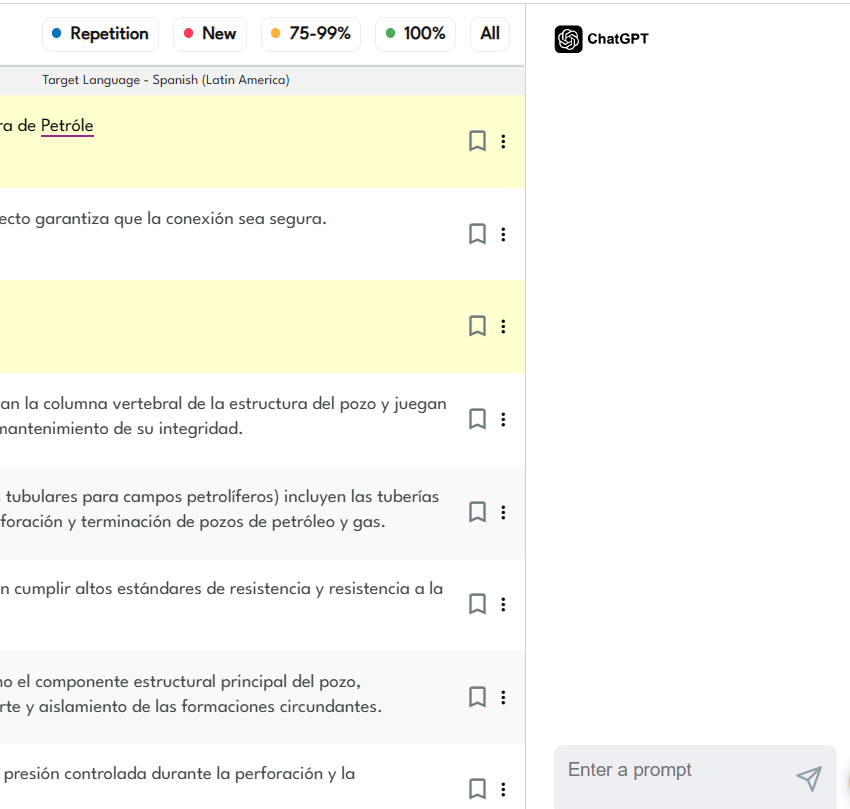
With ChatGPT available inside the app, you can quickly resolve tricky translation issues such as:
- compound terms, word order differences, and awkward phrasing
- alternative translations for idioms or culturally specific language
- choosing the most natural option for your audience
When translations run long (as mentioned, it’s common in languages like German or French) ChatGPT assistants can help manage language expansion. They can generate shorter, clearer phrasing that fits better in tables, labels, and tight layouts.
4. Compatible with the languages you need
Make sure the AI PDF translator supports the language pairs your team works with today, and the languages you’re likely to add as you expand.
This avoids surprises later and ensures the tool fits your actual document workflows across regions, customers, and internal teams. It also saves time long-term because you won’t need to switch platforms or retrain teams when you add new languages.
5. Batch AI PDF translation
Speaking of which, efficiency is key in enterprise workflows. A best-in-class AI PDF translation solution will support batch file translation, allowing you to translate multiple PDF files simultaneously, saving valuable time and resources.
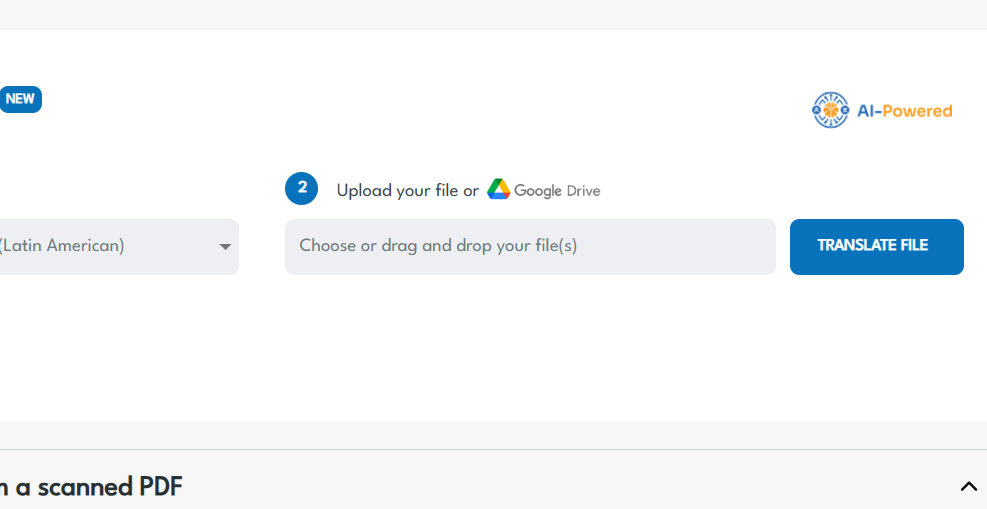
6. Google Drive integration
A Google Drive integration is particularly useful for teams who work with Google files. Your team will save time with seamless file access which eliminates time lost to manual downloads and uploads.
With this integration, you can translate PDFs (as well as Google Docs, Google Sheets, or Google Slides) directly into the target language without moving them in and out of your Google Drive.
7. Flexible user management
Enterprise teams need more than “logins.” The best AI PDF translator should include flexible user management so admins can control who can translate, review, and approve content.
With flexible user management, you can assign and adjust access by role (for example, translators vs. reviewers vs. admins) and scale seats up or down as needs change.
This helps avoid paying for unused access while still keeping occasional stakeholders involved in review and file collaboration.
8. Robust PDF translation editor
The best AI PDF translator will always include robust editing functionality. This will allow you to fine-tune your first-draft translation, make corrections and ensure the final document meets your specific requirements.
Enhance translation quality with AI
Look for a translation editor that incorporates AI by harnessing the power of Machine Translation and Translation Memory. This will enable you to edit and reuse translations. In effect, you continually enhance translation quality.
Boost AI PDF translation productivity with robust editing capabilities
Select AI translation software that includes advanced editing features such as instant messaging, bookmarking, search & replace, translation lookup, segment history and more.
These tools streamline the translation process and contribute to superior multilingual content creation.
9. Uses AI to translate more than PDF files
Versatility is key. Look for a solution that goes beyond PDFs and supports a variety of file formats (e.g. Word, Excel, PowerPoint, InDesign, HTML, etc). This ensures that your translator tool can handle different types of documents commonly used in your organization.
10. Collaboration tools
Efficient collaboration is essential for team productivity. Choose an AI PDF translator that provides collaboration tools, enabling team members to work together seamlessly on translation projects.
In parallel to flexible user management, some collaborative features to look for include file sharing, instant messaging, translation history, segment bookmarking with user permission controls.
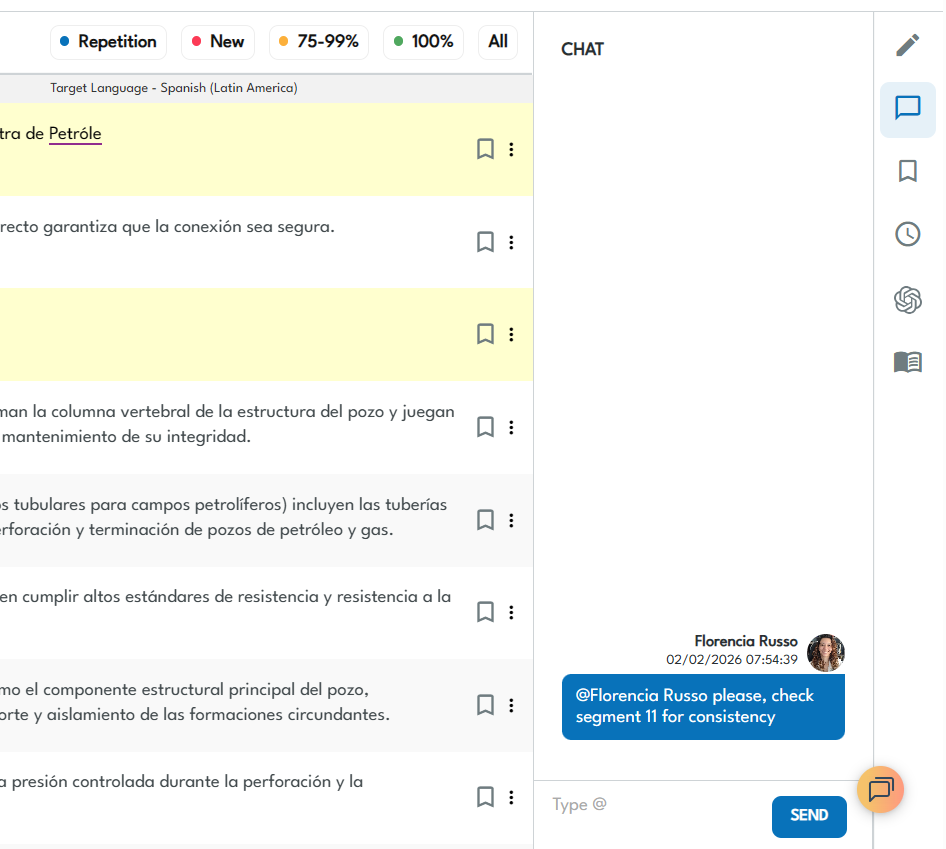
And yes, there are AI PDF translators that support real-time collaboration! Pairaphrase offers real-time co-editing, tracking, and sharing. Read more about the best collaborative translation tools.
11. Robust API
Integration capabilities are essential for seamless workflow integration. Look for an AI PDF translator with a robust API, allowing you to integrate the translation tool into your existing systems and processes.
12. Automatic formatting
When translating PDFs, preserving the original layout is just as important as translating the text itself.
A strong AI PDF translator should assist formatting to retain key structural elements—such as headings, tables, columns, and spacing. Translated documents should remain readable and usable.
That said, no AI tool can perfectly preserve every complex PDF layout. Look for software that handles formatting on a best-effort basis, minimizes disruption during translation, and allows for easy post-editing when adjustments are needed.
13. Encrypted cloud storage
When your team is translating sensitive PDFs, it helps to work in a secure, centralized workspace instead of emailing files around or storing copies across personal devices.
Look for an AI PDF translator that provides encrypted cloud storage so you can upload, store, and manage source and translated files in one place. Alongside an encrypted storage, it should keep access controlled and reduce the risk of version sprawl.
14. Enterprise security
Encrypted storage protects the file. Enterprise security protects the access. Beyond storage, enterprise teams need security controls and governance around who can access content and what they can do with it.
Prioritize an AI PDF translator that supports
- multi-factor authentication (MFA),
- Single Sign-On (SSO),
- role-based access controls,
along with admin oversight features (like access management and activity visibility).
If you work in a regulated environment, also ask the vendor about their broader security program. This could include how they approach penetration testing and vulnerability scanning. Then confirm which controls are available for your plan and deployment.
15. Uses responsible AI
AI should improve speed and quality without increasing risk. When evaluating an AI PDF translator, look for a provider that takes a responsible AI approach—especially if your documents contain confidential, regulated, or customer-facing information.
A responsible AI posture typically includes:
- Human oversight and clear review workflows for high-stakes content
- Reliability and quality controls so outputs are consistent and trustworthy
- Privacy-first data handling with transparent policies on retention, logging, and model training
- Security practices that protect the platform from threats and vulnerabilities
- Vendor governance for any third-party models or subprocessors involved in AI features
In short: you shouldn’t have to trade compliance, confidentiality, or control to benefit from AI-powered PDF translation.
AI PDF translators: security & compliance comparison
When translating sensitive or regulated PDFs, security and governance matter as much as translation quality. This table shows which AI PDF translators are suitable for enterprise use—and which are better left for low-risk, personal documents.
|
Tool |
Encryption & Secure Storage |
SSO / MFA |
Role-Based Access & Admin Controls |
HIPAA / FERPA Suitability |
Data Used for Public Model Training? |
|
Pairaphrase |
Yes (enterprise-grade) |
Yes |
Yes |
Yes (designed for regulated use) |
No (customer-controlled) |
|
Smartcat |
Yes |
Yes |
Yes |
Partial / case-dependent |
Varies by workflow |
|
Smartling |
Yes |
Yes |
Yes |
Partial / case-dependent |
No (per enterprise agreements) |
|
Google Translate (consumer) |
Yes |
No |
No |
Not suitable |
Yes |
|
DeepL (Pro) |
Yes |
Limited |
Limited |
Not designed for regulated use |
No (Pro plans) |
|
Adobe Acrobat (Translate) |
Yes |
Limited |
Limited |
Not positioned for regulated use |
Varies |
|
ChatGPT (consumer) |
Yes |
No |
No |
Not suitable |
Yes |
|
Foxit AI PDF Translator |
Yes |
Limited |
Limited |
Unclear |
Unclear |
|
HiPDF / Monica / NoteGPT / Sider |
Unclear / limited |
No |
No |
Not suitable |
Likely yes |
Free AI PDF translators may be fine for public content, but they’re rarely appropriate for documents involving healthcare, education, legal, or customer data.
Does ChatGPT translate scanned PDF documents?
ChatGPT can help with translation, but it’s not a complete scanned-PDF translation workflow. Remember, OCR, formatting, and governance still matter.
If a PDF is scanned (image-based), you typically need a high quality OCR before any AI can translate it reliably.
And even when you can translate the text, ChatGPT-style workflows usually don’t preserve complex PDF formatting (tables, forms, multi-column layouts) or provide enterprise controls like role-based permissions and audit trails.
ChatGPT alternatives for enterprise level translations
For enterprise teams translating sensitive or high-volume PDFs, it’s usually safer to use a dedicated PDF translation workflow that includes OCR, layout-aware processing, and admin governance.
You can then use ChatGPT-style assistance where it adds value (e.g., shortening text to fit layout, improving fluency, resolving ambiguous phrasing).
Alternatively, you can use Pairaphrase, which can both extract scanned PDF text and translate it using AI and preserve the majority of the formatting. It also has a ChatGPT integration so you can use it directly in the platform as a translation assistant (as we mentioned above).
How to translate PDFs with AI securely (step-by-step)
Secure PDF translation is a workflow. For example, You should be able to upload a file → run OCR → translate → review in context → reuse approved terminology → export in the required format. Here are quick steps to translate PDFs with AI securely through Pairaphrase.
- Classify the PDF (public marketing vs. sensitive/regulated). If it’s HIPAA/FERPA/GDPR-sensitive, avoid consumer tools.
- Run OCR, if needed (scanned PDFs must be “readable” before translation).
- Translate the full PDF (not copy/paste) to reduce layout breakage and missed content.
- Apply terminology controls (glossaries + saved translations) so repeated phrases stay consistent.
- Review in-context (tables, headings, form fields).
- Export in the format your downstream teams need (PDF, editable formats, etc.).
- Reuse what you’ve already translated for the next PDF batch (this is where TM pays off).
AI PDF translation quality and formatting preservation comparison
OCR + complex layout handling is where most tools break—and where post-edit workload explodes.
|
Tool |
Scanned PDF handling (OCR) |
Complex layouts (tables/forms/multi-column) |
Image + text translation |
PDF limits (enterprise relevance) |
Post-edit workload |
Term consistency |
Export options |
|
Pairaphrase |
Yes (OCR for scanned PDFs) |
High (not perfect) |
Better via OCR + file workflow |
Enterprise/batch orientation |
Low–moderate |
High (TM/glossary) |
File-based outputs; workflow-first |
|
Smartcat |
Medium–High |
High |
Medium |
Enterprise |
Moderate |
High |
Enterprise outputs |
|
Smartling |
Medium |
High |
Medium |
Enterprise |
Moderate |
High |
Enterprise outputs |
|
DeepL PDF |
Low for scans unless pre-OCR |
Medium–High on clean PDFs (deepl.com) |
Limited |
Varies |
Moderate |
Medium |
Doc outputs |
|
Adobe Acrobat |
Medium (Acrobat ecosystem) |
Medium–High (Adobe Help Center) |
Medium |
Published limits for online tool |
Moderate |
Low |
PDF-centric |
|
Foxit AI PDF Translator |
Medium (Foxit OCR exists) |
Claims high pre-servation (Foxit) |
Claims yes |
Varies |
Moderate |
Low |
Side-by-side claims |
|
HiPDF / Monica / NoteGPT / Sider |
Varies; OCR tools may exist (HiPDF) |
Low–Medium |
Varies |
Varies |
High |
Low |
Basic exports |
How LLMs improve AI PDF translation quality
LLMs are best as “assistants” for hard segments, while TM/glossaries keep enterprise terminology consistent.
LLMs can help when translation isn’t straightforward. For example they’re great for idioms, compound terms, or sentences that need rewriting to fit tight layout constraints.
How to use LLMs alongside Translation Memory and terminology rules
Used correctly, LLMs complement (not replace) Translation Memory and terminology rules that keep enterprise documents consistent across teams and time. With LLM-powered PDF translators, you can:
- Solve complex translation challenges. Easily handle idiomatic expressions, compound words, and cultural variations.
- Adapt translations for layout constraints. Prompt an AI chatbot to generate shorter, more concise translations that fit your PDF’s design (prevent text expansion).
- Receive alternative phrasing. Get multiple translation options for hard-to-translate phrases, ensuring the final output matches your goals.
LLMs elevate translation quality by offering smarter, context-aware solutions.
Which AI models does Pairaphrase use for PDF translation?
Pairaphrase is a multi-engine AI Translation Management System that combines our proprietary engine with optional LLM workflows. It then locks in consistency with Translation Memory and glossaries.
At a high level, Pairaphrase integrates:
- PairaphraseGPT (our proprietary translation engine) for full-document translation and multilingual content creation—built for enterprise file workflows (including PDFs).
- Optional LLM workflows so teams can choose the right model for the job (for example, ChatGPT and other leading LLMs), depending on quality, tone, and use case.
- Translation Memory + terminology (glossaries/approved phrasing) to keep recurring PDF content consistent across teams, projects, and languages.
Like we’ve mentioned, the foundation of a top-notch AI PDF translator also lies in its MT capabilities and integration. When evaluating AI PDF translation software, look for advanced AI that delivers accurate and context-aware translations that improves quality over time.
FAQ
What is the best AI PDF translator for enterprise teams?
The best AI PDF translator for enterprise teams is one that combines OCR, layout preservation, governance, and security—rather than just translation quality.
Enterprise teams typically need scanned PDF support, consistent terminology across documents, role-based access, auditability, and clear data-handling controls.
Tools designed for regulated or high-volume workflows, such as enterprise translation management systems, are better suited than free or consumer AI PDF translators.
How can I translate a scanned PDF with AI and keep the original formatting?
To translate a scanned PDF with AI and preserve formatting, you need a tool that performs OCR first and then uses AI to translate the full document—not copied text.
Scanned PDFs are image-based, so OCR is required before translation can begin. After OCR, enterprise-grade PDF translators apply best-effort layout preservation to retain tables, columns, and headings, while allowing post-editing to correct edge cases.
This approach significantly reduces manual reformatting compared to text-only translation methods.
Is AI PDF translation safe for confidential or regulated documents?
AI PDF translation can be safe for confidential or regulated documents only when the tool includes enterprise security and governance controls.
For sensitive PDFs, look for encryption, role-based access, SSO/MFA, audit trails, and transparent policies around data retention and model training.
Note: Many free AI PDF translators are not designed for HIPAA-, FERPA-, or GDPR-sensitive content, whereas enterprise platforms are built to support these requirements within controlled workflows.
Recommended AI PDF Translator for Enterprise Teams
Want to get started with the best AI PDF translator for your team? Try Pairaphrase. It’s the AI Translation Management System for teams that value smarter, faster and safer translation.

Pairaphrase supports 140+ languages and 20,000+ language pairs. Use AI to translate PDFs into Spanish, English, French, German, Arabic, Hindi, Chinese, Japanese and more. Not to mention, Pairaphrase performs file translation for 25+ file types.
Just one translation with Pairaphrase can cover your annual subscription!
Get Started
Schedule a demo or share this article with a colleague.
"Your translation service is welcomed at Pambris Law. A reliable, quick and effective timely translation is a rare commodity to find, at that first instance. That level of speed is needed by us to ensure justice is done to any case where the language set differs from English (UK) - thanks."
– Thomas Pambris, Solicitor at Law @ Pambris Law
Reviewed by

Founder and CTO
He is Co-Founder and CTO of Pairaphrase and a leader in translation technology with more than two decades of experience improving how organizations communicate across languages. His work focuses on making multilingual communication more accurate, efficient, and accessible through AI-driven translation solutions, practical innovation, and a strong emphasis on usability, quality, and security.