

/PairaVoice-Start-A-Conversation-nobg-md.png?width=200&height=300&name=PairaVoice-Start-A-Conversation-nobg-md.png)




















.png)

.png)


 ChatGPT
 Google AI
 Perplexity
 Claude
 Grok
GrokTranslating JSON files (JavaScript Object Notation file format) for the internationalization (i18n) of web applications or website content can be tricky. If you’ve ever broken a build from a misplaced comma, a mistranslated placeholder, or a corrupted key-value pair, we know your pain.
JSON is both simple and unforgiving. Therefore, the best way to translate JSON files is using an AI Translation Management System (without burning through tokens). Use robust systems to efficiently protect JSON structure, expedite localization workflows, and protect data in a compliant environment.
To help you avoid common pitfalls like broken syntax, misplaced tags, or corrupted placeholders, we’ve also updated this guide with JSON-specific best practices and workflow tips developers frequently ask about.
About JSON files
In Oracle’s words, JSON allows IT professionals to “transfer populated data structures from any language to formats that are recognizable by other languages and platforms.”
The structure of JSON file data makes it a preferred way for developers to facilitate the exchange of information between web applications. There’s no heavy coding, it’s quick to process, and the text is readable by humans.
Why JSON translations require efficient tools
JSON is deeply structured: key-value pairs, nested objects, arrays, and encoded characters must remain intact for your application to run. That’s why translating JSON requires tools that preserve formatting, placeholders, UTF-8 encoding, and escaped characters.
So if you learn how to translate JSON files online efficiently, your organization’s productivity will be further enhanced when it comes to language translation.
And importantly, you’ll prevent the all-too-common issue of “translation breaking the code,” which happens when generic translation tools fail to parse JSON safely.
Quick JSON translator recommendation
If you need a quick, reliable I18n JSON translator that won’t break syntax nor make you burn through API tokens, use an enterprise-grade AI Translation Management System (TMS) designed for structured file formats like Pairaphrase.
It’s a purpose-built translator for teams that need JSON-safe translation with parsing that keeps keys, tags, URLs, placeholders, and escaped characters untouched. It also won’t unnecessarily burn through tokens.
Why take our advice on translating JSON files?
As translation industry veterans, we work extensively with software teams who handle large volumes of JSON-based UI strings, app configurations, and localization assets.
After supporting thousands of file translations, we’ve seen exactly where code breaks, how placeholders get mangled, and why “quick fixes” often become costly production issues.
This guide draws from that hands-on experience, as well as the JSON translation workflows used by global organizations in healthcare, finance, education, and government.
What you’ll learn in this article
This article will help you:
-
Understand the safest and fastest method for translating JSON files
- Avoid common issues like broken tags, incorrect escaping, and malformed syntax
-
Choose a JSON translation tool with the right features for developers
-
Integrate Translation Memory and terminology to maintain consistency
-
Preserve structure, keys, placeholders, and UTF-8 encoding during translation
-
Build a repeatable JSON localization workflow for your application
How to translate a JSON file, step-by-step
To translate JSON files safely and quickly, follow these steps using Pairaphrase’s file translator:
1. Create or log in to your Pairaphrase account
To get started, purchase a Pairaphrase plan or log in to your existing account.
Pairaphrase is the AI Translation Management System for teams, so once you’re in, you’ll use the same interface for JSON file translation as you do for other file types.
2. Upload your JSON file (or a batch of files)
Next, go to the File Translator and upload your .json file. If you’re localizing multiple environments or locales at once, you can upload several JSON files in a single batch so you don’t have to repeat this step for each one.
3. Choose your target language(s)
Select the target language(s) for your JSON strings (Pairaphrase auto-detects the source language).
This is where you define your JSON localization workflow: you can translate into a single language for a pilot launch, or into multiple languages at once for a broader release.
4. Click “Translate” to generate your JSON draft
Click Translate to create a first-draft translation of your JSON file.
Pairaphrase parses the JSON structure, separates keys from values, and protects placeholders, IDs, URLs, and escape sequences while it translates the text segments.
5. Review and refine in the JSON translation editor
Once the status shows your file as ready, open it in the Translation Editor to review and refine the segments. Here you can:
-
Adjust wording for tone and clarity
-
Ensure UI terminology matches your brand’s product language
-
Take advantage of Translation Memory so repeated strings are already filled in
Because the editor is JSON-aware, you can focus on the text while the structure, nesting, and placeholders stay protected in the background.
6. Download your translated JSON file
When you’re satisfied with the translation, download the translated JSON file directly from your Active Files. The output preserves your original JSON structure, nesting, and encoding—so you can drop it back into your app or localization pipeline without manual cleanup.
Over time, as you translate more JSON files, your Translation Memory helps you reuse approved strings and reduce both turnaround time and token usage.
These steps also support software localization best practices, especially when translating structured app content that must keep its original formatting and functionality.
Best method for JSON translation
To make it easier and faster to translate a JSON file into another language, use enterprise translation software optimized for JSON files, like Pairaphrase. You’ll have access to a suite of features that facilitate faster, higher-quality AI Translation.
Plus, it can allow you to auto-translate JSON file text strings. Critically, you’ll use a JSON-aware parser that protects your data structure while translating only the values.
Best JSON File Translation Software Features for Enterprises and Teams
Read this list of the top features to look for in an online JSON translator that’s built for organizations like yours. We’ll recommend a solution at the end of this post.
1. Sufficient language pairs
Translating JSON files often means supporting multiple markets at once, especially if you’re localizing for SaaS or mobile apps.
JSON localization can span dozens of languages at once, so choose a translator that supports all the language pairs you need now and will need in the future, without compromising structure.
After all, it’s one thing to just translate a JSON file to English from Spanish, for instance. It’s another thing to translate a JSON file to multiple languages. Learn more about how to translate a file into multiple languages at once.
2. Broad file format support beyond JSON files
Does your organization also translate non-JSON files? As a best practice, find a JSON translator software that also performs file translation for other formats.
This way, you avoid the use of separate solutions and build larger Translation Memories that get leveraged to their full potential.
The truth is, JSON-based localization rarely exists in isolation. Teams also translate HTML, XML, CSV, XLIFF, SRT for subtitles, and UI copy stored in spreadsheets. Using one platform for all file types ensures consistent terminology and formatting preservation.
3. AI JSON file translator
The best JSON file translator will come with the following AI translation components. Used together, they give you a high-quality first draft and protect your JSON structure from start to finish.
Reusable translations & terminology
Generic AI translation tools don’t actually understand JSON—they treat it like plain text. This is why you end up with invented fields, broken escaping, translated keys, malformed braces, and a burned-through token bill.
A JSON-aware translation tool wraps AI in structure-aware parsing and reuses what you’ve already translated. With AI-powered translation that combines advanced LLMs, Translation Memory, Terminology Management, and model training, you can:
-
Reuse approved translations anywhere the same JSON string appears
-
Keep terminology consistent across products, screens, and locales
-
Reduce token usage by not re-translating the same text over and over
AI-powered JSON translation tools should give you a high-quality first draft, not a messy starting point. See how Translation Memory compares with glossaries in the video below:
AI Translation Agent for JSON files
A built-in AI translation agent makes JSON translation review faster by helping you fine-tune segments without leaving the editor. Think of it as a “JSON translator GPT” that works inside your file translator instead of in a separate chat window. It can:
-
Suggest alternative phrasings for tricky UI strings
-
Adjust tone and style to match your product voice
-
Clarify confusing terms with intelligent suggestions
-
Help resolve terminology questions without switching tools
This reduces manual QA time significantly. It’s especially helpful for teams localizing large or fast-changing JSON bundles.
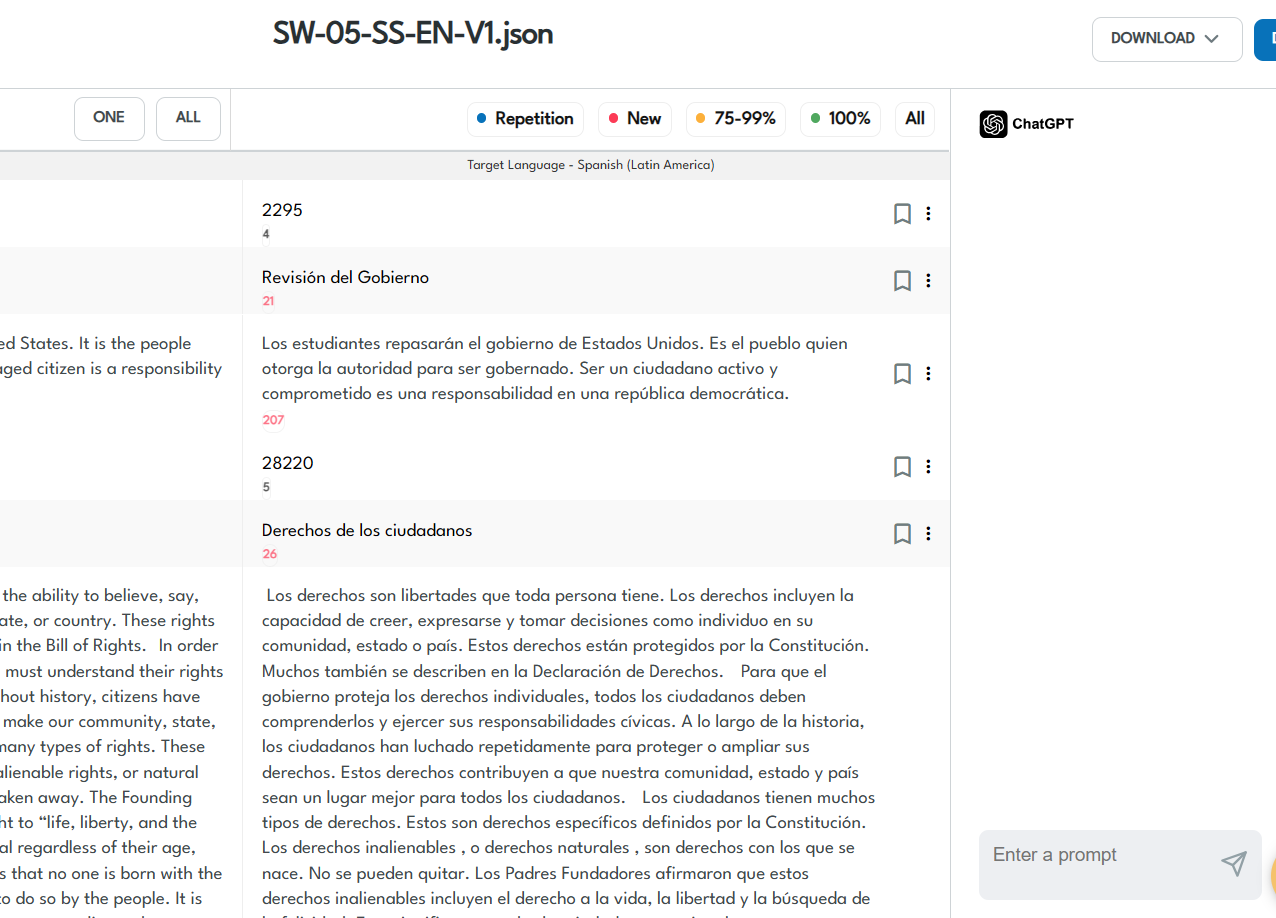
Pairaphrase Translation Agent in the Pairaphrase file editor
Model training
Model Training helps the system learn from your organization’s own content, so your JSON file’s translation suggestions sound like you, not a generic translator.
-
Train on your existing multilingual UI strings and documentation
-
Reflect department-specific tone (e.g., support vs. legal vs. marketing)
-
Improve accuracy for domain terminology across all files
-
Apply learned style to both new translations and future edits
-
Keep output aligned with your brand, region, and reader expectations
AI Sandbox
Some JSON strings are more than labels—they’re microcopy that shapes user experience (UX). An AI Sandbox is where you experiment with that wording before it ever lands in your JSON files.
-
Try alternative phrasings for onboarding flows, prompts, and in-app messages
-
Test different tones and formality levels for specific regions or audiences
-
Generate variant copy for product experiments without touching production JSON
-
Train on your brand assets so suggestions match your voice
-
Move only the strongest, on-brand strings into your JSON translation workflow
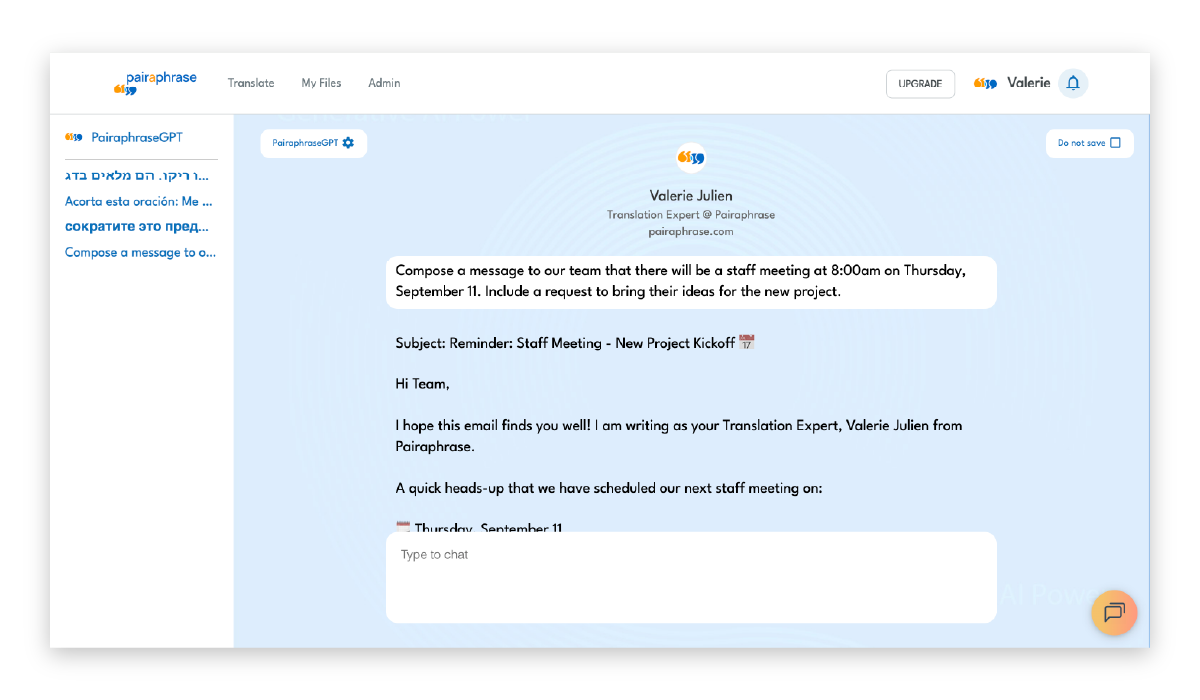
Pairaphrase’s AI Sandbox
4. Powerful JSON translation editor
Want to be able to improve upon the quality of AI-translated JSON strings?
A good translation experience matters especially when you’re working with structured content like JSON. You need a clean, intuitive editor that makes it easy to review and improve AI-translated segments without risking accidental damage to your file structure.
Choose translation software that includes a robust JSON file translation editor.
A strong Translation Memory combined with a JSON-safe editor helps you improve quality quickly. When you edit a segment once, the updated translation can be applied automatically across all identical UI strings in your JSON files.
This reduces repetitive work, keeps language consistent, and trains your translation engine to deliver better results over time.
Search & replace for structured strings
A structured “search & replace” feature lets you update UI language quickly, without modifying keys, braces, or escape characters. This is especially helpful when you need to update the same term across multiple JSON files or product modules.
Segment history & translation lookup
When you’re reviewing frequent UI phrases (“Save,” “Email,” “Submit”), a JSON editor that shows segment history helps you track how those strings have changed across projects and languages. Translation lookup makes it easy to reuse the best version.
Bookmarks, comments & collaboration
Features like bookmarking, inline comments, and built-in messaging help translators and developers coordinate more easily, ensuring nothing gets lost during review cycles.
5. Batch JSON file translation
Do you produce large amounts of localized content? If so, it’s worth noting that some online JSON translation tools only allow you to translate JSON files one by one.
That being said, JSON translators that allow you to translate multiple files at once are hands down the best way to translate a JSON file while saving time. This capability is called “batch translation.”
6. JSON localization workflow & real-time JSON translation collaboration support
JSON localization isn’t just about translating text. It’s about managing updates across development, staging, and production.
For an efficient JSON translation workflow, you need to keep your UI strings consistent as new features ship and product updates roll out. To do that well, you need a translation environment where your team can stay aligned and work from the same source of truth.
Choose a JSON translation tool that makes it easy to manage updated strings, track changes, and re-translate only what’s new, so your files stay current throughout the development cycle.
For example, tools like Pairaphrase support this workflow with collaboration features that help teams stay organized, including:
-
Shared access to files so everyone works from the latest version
-
Inline comments to clarify terminology or UI intent
-
Revision history to review or revert changes
-
Instant messaging for real-time translator–developer communication
-
User permission controls to keep the right people in the right roles
-
Segment bookmarking to flag items that need attention or mark where you left off
These collaboration and workflow tools help prevent misalignment, reduce rework, and keep your JSON localization process running smoothly as your product evolves.
7. Encrypted cloud storage
Encrypted cloud storage is an important part of translating JSON files online in a secure and efficient manner. Speaking of cloud storage, it will often enable centralized access for your authorized colleagues.
You’ll be able to manage users and user permissions better. Plus, you’ll eliminate confusion over which file version is the most current.
8. Robust API for delivering JSON translations to other applications
Want to connect your applications to an API that allows you to auto-translate JSON files online? Look for a robust API that delivers more than just raw translation.
You want one that offers multiple API calls and pulls from your Translation Memory to deliver high-quality translations.
9. Terminology Management
Successful software localization requires consistency across many languages. Therefore, when you translate JSON files into another language, you want to keep your terminology consistent.
To do this efficiently, seek a strong Terminology Management component in a JSON translator tool.
First, learn how to create a Term Base for AI translation if you don’t already have one.. Once you’ve done that, you need to import it into your Translation Management System.
This will improve productivity within the human translation workflow while improving the quality and consistency of translations.
10. Translates JSON files online (always)
Want to work productively and with ease? In today’s world, using cloud-based software is crucial for making this a reality.
As a developer, you understand first-hand how many obstacles you can encounter when using a desktop-based program or a desktop-first hybrid. That’s why we highly recommend you choose a web-first translation solution for JSON file translation.
We’ll recommend a solution at the end of this post.
11. Audio localization
If your team also localizes tutorial videos or audio content, look for a platform that supports audio localization.
Pairaphrase enables teams to produce translated audio files from text-based files. This means you can, for instance, generate voiceovers in different languages and download an audio file. It supports files like SRT (subtitles) and video files like MP4, helping you to localize your video content.
12. Enterprise security
Last but not least, your organization should use a top JSON translator that employs enterprise security. Data security is very important and should be a high priority when it comes to your organization’s data.
If you work in a regulated industry, choose a translator that supports secure file handling, audit trails, and compliance with standards like HIPAA, FERPA, and GDPR. JSON often contains user-facing text or system messages that must be handled with care.
Seek features such as multi-factor authentication (MFA), Single Sign-on (SSO), and the highest levels of encryption. Furthermore, ask the software supplier if they regularly perform penetration testing and vulnerability scans.
Essential Features Checklist for a JSON Translator
When you compare tools for JSON file translation, these are the features that matter most. So, how does a purpose-built JSON translation tool like Pairaphrase include all of them?
See how you can translate JSON files without breaking structure, losing formatting, or wasting tokens, using Pairaphrase.
|
Feature Name |
How it helps JSON file translations |
Included in Pairaphrase? |
|
JSON structure preservation |
Keeps keys, braces, nesting, and escape characters intact so you don’t break code when translating JSON. |
Yes |
|
Key/value separation |
Ensures only translatable UI text is modified, while keys, IDs, enums, and system values stay untouched. |
Yes |
|
Placeholder protection |
Protects placeholders like {0}, %s, {username}, and other tokens so logic and formatting remain correct. |
Yes |
|
JSON syntax validation |
Catches missing quotes, mismatched braces, and malformed JSON before you download the translated file. |
Yes |
|
UTF-8 encoding preservation |
Ensures multilingual characters (e.g., Arabic, Japanese, Chinese, Korean) display correctly across apps. |
Yes |
|
AI-powered translation (without burning through tokens) |
Uses LLMs plus parsing and Translation Memory to generate high-quality first drafts for JSON strings. |
Yes |
|
Translation Memory for JSON |
Reuses approved translations for repeated JSON strings, reducing cost and token usage over time. |
Yes |
|
Terminology Management for UI strings |
Keeps product names, button labels, and in-app terms consistent across languages and JSON files |
Yes |
|
Translates large JSON files |
Handles big UI bundles and nested JSON structures without crashing or timing out. |
Yes |
|
Secure file translation |
Encrypts JSON files and supports enterprise security controls for regulated industries. |
Yes |
|
Collaboration tools |
Enables teams to share, review, and comment on JSON translations without risking structure. |
Yes |
|
Version history and user audit trails |
Tracks who changed what and when—important for compliance and governance. |
Yes |
|
Text-to-audio and SRT files |
Helps you convert related UI help text or onboarding strings into audio for accessibility purposes or SRT subtitles. |
Yes |
FAQ
How do I translate JSON files without breaking code?
The best way to translate JSON files without breaking code is to use a tool built specifically for JSON translation. Generic AI models treat JSON as natural language, so they often break structure by translating keys, altering placeholders, or removing braces.
JSON-safe translation software parses the file, protects non-translatable elements, and validates syntax before export.
Can I translate JSON files with AI safely?
You can translate JSON files safely with AI if you use a JSON-aware platform that understands structure. Pairaphrase uses structured parsing plus Translation Memory to ensure the AI respects keys, IDs, variables, URLs, placeholders, and escape sequences.
This gives you the speed of Generative AI without malformed JSON or wasted tokens.
How do I translate JSON files without burning through tokens?
To translate JSON files without burning through tokens, use a system that combines AI with JSON parsing and Translation Memory. With tools like Pairaphrase, you never re-pay tokens for strings you’ve already translated or for tags/non-text characters.
The system reuses approved translations across all your JSON files, dramatically reducing LLM usage and cost.
What’s the best way to localize JSON for SaaS or mobile apps?
The best way to localize JSON for SaaS or mobile apps is to use a platform designed for app strings and UI localization. Look for key/value separation, Terminology Management, and batch translation.
These features ensure consistent UI language across screens, flows, and product modules—even at enterprise scale.
How do I preserve placeholders while translating JSON?
You preserve placeholders during JSON translation by using a JSON-safe tool that locks them automatically. A good platform will protect items like {0}, %s, {username}, and other tokens so the AI cannot modify, translate, or delete them.
Does Pairaphrase support JSON files with nested objects?
Yes, Pairaphrase supports JSON files with nested objects. The platform preserves nested levels, arrays, escape sequences, and complex UI structures so nothing breaks during translation.
Recommended JSON file translator tool
Want to get started with the best JSON file translator? Try Pairaphrase. It’s the AI Translation Management System for teams that value smarter, faster and safer translation.

Pairaphrase supports 140+ languages and 20,000+ language pairs. Translate JSON files into Spanish, English, French, German, Arabic, Hindi, Chinese, Japanese and more. Not to mention, Pairaphrase performs file translation for 25+ file types.
Just one translation with Pairaphrase can cover your annual subscription!
Get Started
Schedule a demo or share this article with a colleague.
"Pairaphrase has delivered an easy to use and cost effective translation service, allowing teams across the country to efficiently manage their translation needs."
- Liz Bouchard, Marketing Manager, @ Armtec

Reviewed by

Founder and CTO
He is Co-Founder and CTO of Pairaphrase and a leader in translation technology with more than two decades of experience improving how organizations communicate across languages. His work focuses on making multilingual communication more accurate, efficient, and accessible through AI-driven translation solutions, practical innovation, and a strong emphasis on usability, quality, and security.